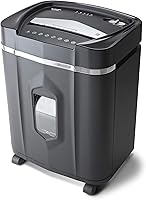
What Paper Shredder Should You Buy? A Simple Checklist
For what paper shredder to buy, match the cut type and run cycle to your paperwork. Choose cross-cut for routine documents, micro-cut for smaller pieces, or auto-feed when you regularly handle large stacks.
On this page (9 sections)
- What paper shredder should you buy for your documents?
- How much paper do you usually shred?
- How long should a shredder run before cooling down?
- Is an auto-feed shredder right for your workload?
- How much bin space and room do you need?
- Which extra features will you actually use?
- How should you set up and care for a shredder?
- What common buying mistakes should you avoid?
- What paper shredder should you buy for your routine?
For what paper shredder to buy, match the cut type and run cycle to your paperwork. Choose cross-cut for routine documents, micro-cut for smaller pieces, or auto-feed when you regularly handle large stacks.
The right fit depends on what you shred, how often you shred it and where the machine will sit. A bigger sheet limit won't help much if the run cycle is too short for your backlog, or the bin is awkward to empty.
Use this guide to compare those trade-offs and choose a machine that fits your routine. Our paper shredder buying guide explains cut types and security levels in more detail.
What paper shredder should you buy for your documents?
Choose a cut type and security level that fit the sensitivity of your paperwork. Cross-cut and micro-cut machines turn paper into smaller pieces than strip-cut machines, and the model's stated security level helps you compare security more precisely.
Both cross-cut and micro-cut models can be rated P-4. So, don't choose by the cut name alone: compare the stated level and particle size, then decide whether you want the smaller pieces associated with micro-cut.
For routine bills, mail and household records, a P-4 cross-cut shredder may suit your needs. If you regularly handle confidential paperwork and prefer smaller pieces, compare P-4 micro-cut options and their operating limits.
Read our cross-cut vs micro-cut guide for help weighing that choice. If you haven't used a cross-cut machine before, learn what a cross-cut shredder is.
How much paper do you usually shred?
Choose sheet capacity around your normal batch, not the biggest number you can find. A maximum capacity applies under the maker's stated conditions, so feed fewer sheets when paper is thicker or larger than the specified type.
| Your routine | What to compare |
|---|---|
| A few pages now and then | Manual-feed capacity and an easy-to-empty bin |
| Mail and weekly household paperwork | Capacity, jam controls and bin size |
| Several jobs in one sitting | Run time, cool-down and bin capacity |
| Large stacks | Auto-feed capacity, mode limits and full operating cycle |
Higher capacity can mean fewer feeding rounds, but it doesn't mean the shredder can run continuously. Check the cycle separately, especially if you're clearing a backlog.
The Bonsaii C282-A suits you if you want a manual-feed cross-cut machine for regular household or home-office paperwork. It shreds up to 12 sheets at once and is rated P-4.
The stated 15-minute run period can help with a longer session, while the reverse control gives you a way to clear paper jams.
Skip it if your main goal is micro-cut pieces or unattended auto-feed. For occasional batches, use the reverse control only as directed in the manual, and stop feeding if the shredder struggles rather than forcing more paper through.
How long should a shredder run before cooling down?
Choose a run cycle that covers your largest likely job, then plan around the required rest period. A short cycle can suit occasional paperwork, while a longer stated run time can help when you process multiple batches in one session.
Compare both the on-time and the off-time. Aurora specifies a 60-minute continuous run time for the AU1210MA; the Bonsaii auto-feed model has a 30-minute-on, 60-minute-off cycle in auto mode and a 10-minute-on, 60-minute-off cycle in manual mode.
A longer run period doesn't eliminate the need to check for a full bin or a jam. See our paper shredder run-time guide for help planning a large shredding job.
The Aurora AU1210MA suits you if you want micro-cut pieces and expect to work through a substantial batch in one sitting. It also has anti-jam auto-reverse and indicator lights for standby, overheat, bin-full, overload and open-door status.
Skip it if you don't need the longer cycle or would rather have a larger bin: its capacity is 5 gallons. Before a long session, make sure there's room to pull out the basket and a convenient place for the shredder to cool.
Is an auto-feed shredder right for your workload?
Auto-feed can help when large paper stacks are a regular job and you want to load a batch rather than feed every sheet by hand. Check its automatic sheet limit, run cycle and accepted materials before deciding.
The Bonsaii auto-feed model handles up to 120 sheets of paper in automatic mode. Manual mode handles up to 12 sheets and can take mail, cards and staples; auto mode is for paper only.
Choose this model if you often accumulate stacks of paper and want to load them in batches. It makes P-4 micro-cut pieces and has a 5.9-gallon pullout bin with casters.
Its 30-minute auto cycle is followed by 60 minutes off, so it suits planned batches rather than continuous all-day work.
Skip auto-feed if you mostly shred a few pages at a time or need one machine to process mixed materials without switching modes. In automatic mode, use paper only.
Check the manual before putting mail, cards or staples through manual mode.
How much bin space and room do you need?
Choose a bin that suits your paper volume, then measure where the shredder will go. A larger bin means fewer trips to empty it, but you still need space to open the bin and feed paper safely.
Check how the wastebasket comes out and whether you can reach it without moving other furniture. A viewing window or bin-full indicator helps you see when it's time to empty the basket.
The Fellowes Powershred 99Ci fits a shared home or office where several people may shred documents. It accepts up to 18 sheets per pass, is rated P-4 and has a 9-gallon bin with a bin-full indicator.
The stated 30-minute run time suits bigger batches.
Skip it if you only shred a few pages now and then or don't have room for a larger floor-standing machine. It's about 17.31 in deep, 11.44 in wide and 25.19 in high, so check both the storage spot and the route through doorways before you buy.
Which extra features will you actually use?
Choose extras based on your routine and the materials you'll shred. Reverse controls, safety features, status lights and casters solve different problems, so focus on the ones that matter in your space.
- Jam controls: Manual reverse or auto-reverse can help clear a paper jam.
- Safety: Check how the shredder responds when its bin is removed or someone touches the opening. The Fellowes 99Ci has SafeSense, which disables shredding when hands or paws touch the opening.
- Status lights: Indicator lights can show conditions such as bin-full or overheat.
- Mobility: Casters can help when you need to move a larger machine.
- Other materials: Confirm whether the specific model accepts staples, cards, clips, CDs or DVDs.
Never assume a shredder accepts every card, staple, clip or disc. Follow the manual for that model, and don't feed metallic credit cards into a machine unless its instructions allow them.
Our guide to shredding credit cards and staples explains what to check before you feed non-paper items.
How should you set up and care for a shredder?
Set up the shredder on a stable, accessible surface and follow its manual before switching it on. Make sure the bin is seated correctly, the power cord can reach safely and you have room to feed sheets without leaning over the opening.
Keep the basket from getting overfilled. Empty it when the indicator or viewing window shows it is full, or when the manual recommends; loose scraps can interfere with use.
For a pullout bin, switch the machine off before removing or replacing the basket.
Use only the paper size, weight and materials allowed for that model. Don't force a thick stack through the opening, and don't use aerosol products in or around a Bonsaii shredder.
If the machine jams, use its reverse control only as the manual directs.
Give the shredder the required cool-down period before the next run. For cleaning steps and safe upkeep, follow our paper shredder cleaning guide and how-to-use guide.
What common buying mistakes should you avoid?
The most common mistake is choosing by one impressive number, such as sheet capacity, while ignoring the rest of the work cycle. A shredder needs to fit the paper you handle, the session length and the space around it.
Avoid these errors:
- Treating maximum capacity as a target: Feed within the stated limit and account for paper size and weight.
- Confusing capacity with endurance: A high sheet count doesn't tell you how long the machine can run.
- Ignoring the rest period: Check how long the shredder must cool before another job.
- Assuming every material is accepted: Verify cards, staples, clips and discs in the manual.
- Buying a bin that's too small: Estimate how often you'll shred and how often you're willing to empty it.
- Forgetting access space: Measure where the machine sits and leave room to use its controls and remove the bin.
If several people will use the shredder, post its mode limits nearby or make sure everyone knows them. That helps prevent someone from putting the wrong material into auto-feed or overloading a manual slot.
What paper shredder should you buy for your routine?
For what paper shredder to buy, choose the Bonsaii C282-A if you want straightforward manual-feed cross-cut shredding for household or home-office batches. Choose the Aurora AU1210MA if you prefer micro-cut pieces and a long stated run time, or the Bonsaii auto-feed model if large paper stacks are a regular task.
For shared workloads and a larger bin, choose the Fellowes 99Ci. Whichever model you choose, compare its cycle, accepted materials and dimensions with your real routine, then use our home-office shredder guide to plan the setup.
Frequently asked questions
What is a good paper shredder for home use?
A good home shredder matches your paperwork, privacy needs and available space. Cross-cut can suit routine household documents, while micro-cut makes smaller pieces; check the security level, capacity, run time, bin size and accepted materials before you choose.
For occasional use, a large auto-feed capacity may be unnecessary.
Should I buy a cross-cut or micro-cut shredder?
Choose cross-cut for routine paperwork or micro-cut when you want smaller paper pieces. Check the model's stated security level because both cut types can be rated P-4.
Also compare sheet capacity, run time and bin size, which affect how easily the machine handles your usual workload.
How many sheets should a paper shredder handle?
Choose a stated capacity that suits your usual batch, while leaving room to feed fewer sheets if your paper is thick or larger than the maker's stated conditions. A smaller capacity can work for occasional mail.
If you process stacks often, compare capacity alongside run time and cool-down.
Is an auto-feed paper shredder worth buying?
An auto-feed shredder can suit you if you regularly process large paper stacks and want to load them in batches. Check its sheet limit, run and rest periods, and whether automatic mode accepts paper only.
Use manual mode for other materials only when the model's instructions allow them.
What should I check before buying a paper shredder?
Compare cut type, security level, sheet capacity, run time, cool-down, bin capacity, dimensions, jam controls and accepted materials. Measure the space and route into the room, then review the manual for safe operation and care.
Confirm that the machine accepts each extra item you plan to shred.