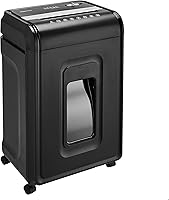
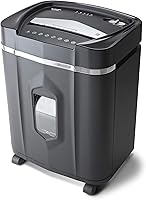
Choosing a Paper Shredder for a Home Office
Choose a paper shredder for a home office by matching cut type, workload and run time to the documents you handle. Compare feeding method, bin size and safety features so the shredder fits your weekly routine.
On this page (9 sections)
- How do you choose a paper shredder for a home office?
- Which shredder fits your home office workload?
- Should you choose cross-cut or micro-cut for home office papers?
- How much run time does a home office shredder need?
- How do capacity and bin size affect daily use?
- What should you check before shredding cards or mail?
- How should you set up and care for a home office shredder?
- What common shredder mistakes should you avoid?
- Which paper shredder should you choose for a home office?
A paper shredder for a home office should match the documents you handle, the size of your usual batch and the time you have to shred. For routine household records, cross-cut may suit your needs; choose micro-cut if you want smaller paper particles.
Start by thinking about the actual stack: a few bills each week, unopened mail, or a box of old records will call for different feeding methods and run times. Then consider where the shredder will sit and how often you want to empty its bin.
This guide compares four models by cut type, workload, run time and features. For a wider overview of cut styles and buying factors, start with our paper shredder buying guide.
How do you choose a paper shredder for a home office?
Choose by security need, typical batch size, feeding style and session length. Bin size, placement and safety features help narrow the options once you know how you plan to use it.
| Factor | What to check | Why it matters |
|---|---|---|
| Cut type and security | Cross-cut or micro-cut, plus the stated security level | Helps you match shredded pieces to the sensitivity of your papers |
| Sheet capacity | Maximum sheets per pass, or auto-feed capacity | Affects how many passes a stack may need |
| Run time | Continuous run time and cool-down period | Helps you plan a session around the shredder's limits |
| Bin capacity | Gallons or liters, and whether the bin pulls out | A larger bin can mean fewer stops to empty it |
| Safety and movement | Safety lock, casters and indicator lights | Helps you plan where the shredder can sit and how it can be moved |
A maximum sheet count is a limit to check against your paper and the manual, not a required load for every pass. Feed less if a stack is folded, thick or mixed with other materials.
Which paper shredder features matter most for home office work?
For home office use, cut type, operating limits and accepted materials matter more than a long list of extra features. All four models here have P-4 security, but differ in cut style, capacity and feeding method.
A 12-sheet manual shredder can be enough if you handle small stacks throughout the week. If you save paperwork for a longer session, compare the model's continuous run time and cool-down period with the length of that job.
Auto-feed can reduce the amount of manual feeding when you have paper-only batches, but it doesn't mean every material belongs in the feeder. Check whether cards, mail, staples or clips are allowed in the mode you plan to use.
Bin size and placement affect the routine too. A pull-out bin makes collected shreds easier to remove, while casters help when you need to move a shredder between work areas.
Which shredder fits your home office workload?
Choose a model with a feeding method and run time that fit your regular workload. These options cover short manual batches, longer continuous sessions and automatic feeding for paper.
Bonsaii 15-Sheet Cross-Cut 40-Minute Shredder: longer sessions
The Bonsaii 15-Sheet Cross-Cut 40-Minute Shredder suits a home office that collects a larger stack before shredding. It handles up to 15 sheets per pass and is specified for up to 40 minutes of continuous running, followed by 40 minutes of cooling.
Bonsaii says this model handles paper, CDs, credit cards, mail and staples. Auto start, stop and reverse functions, plus indicator lights for overheating and overload, help you manage a session.
Choose it if you want a longer stated run time and mainly shred manually. Skip it if micro-cut output or automatic feeding is a priority.
Bonsaii 120-Sheet Auto-Feed Micro-Cut Shredder: paper-only stacks
The Bonsaii 120-Sheet Auto-Feed Micro-Cut Shredder suits someone who wants to load a paper stack for automatic feeding. Auto mode handles up to 120 sheets of paper, while manual mode handles up to 12 sheets.
Bonsaii specifies 30 minutes on and 60 minutes off for auto mode. Manual mode is specified for 10 minutes on and 60 minutes off, and can handle mail, cards and staples.
Bonsaii advises against shredding metallic credit cards. Auto mode is for paper only, so separate mixed materials before loading the feeder.
Choose it if your larger jobs are mostly paper and you can work within its mode-specific limits. Skip it if you need to feed mixed materials automatically or want shorter intervals between sessions.
Bonsaii 12-Sheet Micro-Cut Shredder: smaller manual batches
The Bonsaii 12-Sheet Micro-Cut Shredder suits a home office that wants micro-cut output and shreds manageable stacks at a time. It handles up to 12 sheets per pass and is specified for up to 20 minutes of continuous running.
Bonsaii says it can also shred credit cards, staples, paper clips and CDs. Its stated particle size is 5 x 12 mm, and it has overload protection.
Choose it if you want micro-cut output, manual feeding and a movable bin. Skip it if you regularly need to clear a long stack in one session.
Fellowes Powershred 12-Sheet Cross-Cut Shredder: a lockable deskside option
The Fellowes Powershred 12-Sheet Cross-Cut Shredder suits a home office that wants cross-cut output and a way to disable the shredder when it's not in use. It handles up to 12 sheets per pass and has a 5-gallon pull-out bin.
Fellowes specifies P-4 security and says the model can handle paper, staples, paper clips, credit cards and unopened junk mail. It's specified for up to 20 minutes of continuous use before a cool-down period is needed.
Choose it if the safety lock and cross-cut output fit your home office. Skip it if you want micro-cut pieces or a longer stated run time.
Should you choose cross-cut or micro-cut for home office papers?
Choose micro-cut when smaller paper particles are a priority, and cross-cut when it suits the documents you routinely dispose of. Cut type and stated security level are useful together, but the model's instructions still determine which materials you can feed.
The Bonsaii 12-sheet and 120-sheet models are micro-cut, with stated particle sizes of 5 x 12 mm and 4 x 12 mm. The Fellowes 12-sheet and Bonsaii 15-sheet models are cross-cut.
All four models have a P-4 security level. Compare their cut type and operating features with your own needs, then see our guide to cross-cut vs strip-cut shredders.
If your decision is between cross-cut models for ordinary household records, our cross-cut paper shredders for home use guide covers more options.
How much run time does a home office shredder need?
Choose run time by how long your usual shredding session takes, including time to gather and feed papers. Check the cool-down requirement as well, since a longer run may still mean waiting before the next session.
The Bonsaii and Fellowes 12-sheet models are specified for up to 20 minutes of continuous use. The Bonsaii 15-sheet cross-cut model is specified for up to 40 minutes followed by 40 minutes of cooling.
The auto-feed Bonsaii has different limits by mode: 30 minutes on and 60 minutes off for auto-feed, and 10 minutes on and 60 minutes off for manual use. If your session involves both modes, plan around the limit that applies to each.
For more detail on planning around those limits, read paper shredder run time and cool-down.
How do capacity and bin size affect daily use?
A higher sheet capacity can reduce the number of passes, while a larger bin can mean fewer interruptions to empty it. Compare both with the stack you usually shred and the floor space you have.
The two 12-sheet models use manual feeding. The Bonsaii auto-feed model takes up to 120 sheets of paper in auto mode, but its manual capacity is 12 sheets.
The bins range from 4.2 gallons on the Bonsaii 12-sheet micro-cut model, to 5 gallons on the Fellowes 12-sheet and Bonsaii 15-sheet models, and 5.9 gallons on the auto-feed model. Consider how often you want to empty the bin and how you'll carry shreds to recycling or disposal.
Measure the space where the shredder will sit, including the room needed to pull out the bin. Casters on the Bonsaii models can help you move them, but follow the setup instructions before moving a unit.
What should you check before shredding cards or mail?
Check the model's accepted materials and operating mode before feeding anything besides paper. A shredder may accept a card in manual mode while limiting its auto-feed mode to paper.
The Bonsaii 12-sheet micro-cut and Fellowes 12-sheet cross-cut models both specify credit cards, staples and paper clips. Fellowes also specifies unopened junk mail, while Bonsaii lists CDs as an accepted item.
The Bonsaii 15-sheet model lists CDs, credit cards, mail and staples. For the 120-sheet auto-feed model, auto mode is for paper only; manual mode can handle mail, cards and staples.
Bonsaii advises against shredding metallic credit cards with the auto-feed model. For more guidance on checking compatibility, read whether a paper shredder can shred credit cards and staples.
How should you set up and care for a home office shredder?
Set up the shredder on a stable, accessible spot with room to open and empty its bin. Read the model's manual before plugging it in or feeding paper, especially if the shredder has multiple operating modes.
Keep the feed slot clear of loose items and stack documents before starting. Use the correct mode for the material, and avoid loading more sheets than the stated capacity.
Empty the bin before it becomes difficult to remove or close. Paper scraps can build up around the cutting area, so follow the maker's care instructions for clearing scraps and maintaining the blades.
If the shredder slows down, reverses or stops, pause and check its indicator lights and manual instead of forcing more paper through. A jam or overheating warning is a cue to follow that model's recovery steps and respect its cool-down interval.
What common shredder mistakes should you avoid?
The most common mistakes are overloading the feed slot, ignoring mode limits and leaving no room to empty the bin. A few setup habits can prevent interruptions and make the machine easier to use.
- Don't treat maximum sheet capacity as the right amount for every stack. Follow the manual and feed fewer sheets if pages are folded or thick.
- Don't use auto-feed for items the mode doesn't accept. The 120-sheet Bonsaii model's auto mode is for paper only.
- Don't keep feeding when the shredder signals overload or overheating. Pause and follow the model's instructions.
- Don't place a shredder where you can't pull out its bin or reach its controls.
- Don't assume all cards or other materials are safe to shred. Check the model's specific guidance first.
Which paper shredder should you choose for a home office?
Choose the Bonsaii 15-Sheet Cross-Cut 40-Minute Shredder for longer stated manual sessions, the Bonsaii 120-Sheet Auto-Feed Micro-Cut Shredder for paper-only automatic batches, or the Bonsaii 12-Sheet Micro-Cut Shredder for routine micro-cut jobs. Pick the Fellowes if its safety lock and cross-cut style fit your deskside setup.
Before deciding, match cut type and accepted materials to your documents, then compare run limits, bin size and available space. If micro-cut is your main priority, see our best micro-cut shredder for home use guide.
Frequently asked questions
What type of shredder is best for a home office?
The best type depends on how sensitive your papers are and how much you shred. Cross-cut suits routine household paperwork, while micro-cut makes smaller pieces for documents you want to dispose of more carefully.
Match the cut type with the job size, run time and bin capacity.
Is a micro-cut shredder better than a cross-cut shredder?
Micro-cut shredders produce smaller particles than cross-cut models, which can suit sensitive paperwork. Cross-cut may be enough for routine mail and household records.
Compare security level, sheet capacity, run time and bin size along with cut type so you choose for the full job.
How many sheets should a home office shredder handle?
Choose sheet capacity based on the size of your usual stack, and feed fewer sheets when paper is thick, folded or mixed with other material. A higher stated capacity can reduce repeated feeding, but it does not tell you how long the shredder can run before cooling.
How long can a home office shredder run?
Run time varies by model and operating mode. Check the stated continuous run time and required cool-down period, then compare them with the length of your typical shredding session.
If you shred in batches, a shorter run time may be enough when you can pause between jobs.
Can a paper shredder shred credit cards?
Some shredders are specified for credit cards, but check the exact model's instructions before feeding one. Auto-feed modes may have different accepted materials from manual mode, and some models exclude certain card types.
Follow the maker's guidance for cards, staples, clips and other items.