Micro Cut vs Cross Cut Shredder: Which Fits You? (October 2026)
Choose a micro-cut shredder for smaller pieces and P-4 security, or cross-cut for P-3 security and a compact paper routine. Match the micro vs cross cut shredder to your documents, batch size and available space.
On this page (10 sections)
- Micro vs cross cut shredder: what is the difference?
- Which cut style offers more document security?
- How do run time and cool-down compare?
- Which shredder fits your paper volume and available space?
- What can these micro-cut and cross-cut models shred?
- How should you set up a shredder before the first use?
- What habits help prevent jams and overheating?
- Which of these 3 shredders should you choose?
- What are common mistakes when choosing a shredder?
- Is micro-cut worth choosing over cross-cut?
Choose a micro-cut shredder for smaller pieces and P-4 security, or cross-cut for P-3 security and a compact paper routine. The right micro vs cross cut shredder depends on how sensitive your documents are, how much you shred at once and how long each session lasts.
Micro-cut is a clear fit when the smaller pieces and higher security level matter to you. Cross-cut can be the practical choice for routine household paperwork when P-3 suits your needs and you value a smaller machine.
The three examples here also show why cut style does not tell the whole story. Their run times range from 9 minutes to a stated 60 minutes, and bin sizes and supported materials vary too.
 Best for longer home sessions
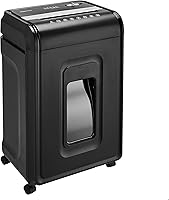
Amazon Basics 12-Sheet Micro-Cut Shredder
 Best for compact home offices
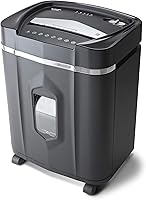
Amazon Basics 12-Sheet Cross-Cut Shredder
Micro vs cross cut shredder: what is the difference?
Micro-cut shredders make smaller pieces than the cross-cut model in this comparison, and the micro-cut examples carry a P-4 rating. Compare the cut size and stated security level for each model instead of assuming every shredder with the same cut style performs alike.
The Amazon Basics micro-cut model cuts paper into 0.2 x 0.5-inch pieces and meets P-4 standards. The Amazon Basics cross-cut model makes approximate 0.2 x 1.2-inch pieces and meets P-3 standards.
Aurora's AU1210MA is also P-4, with pieces measuring 5/32 x 15/32 inches. The exact figures vary by model, so check the security rating and cut size when comparing another shredder.
For a broader explanation of cut types and security levels, see our paper shredder buying guide. It can help you match a shredder to the sensitivity of the papers you discard.
Which cut style offers more document security?
Micro-cut is the stronger fit when you want the P-4 level and smaller pieces shown by these models. Cross-cut may suit everyday papers if P-3 meets your needs.
P-4 and P-3 are different security levels under DIN 66399. The standard defines categories for secure destruction of data carriers, but your organization may set rules for handling particular documents.
For highly sensitive business, legal or regulated records, follow your organization's destruction policy. A shredder's cut type by itself doesn't tell you whether it meets a specific workplace requirement.
Our guide to what a cross-cut shredder is explains its cut pattern and who may prefer it. If cross-cut fits your needs, compare the best cross-cut shredders for home use.
How should you choose micro vs cross cut security?
Choose P-4 micro-cut when smaller pieces are a priority, and choose P-3 cross-cut when that level fits your paperwork. If a workplace or client requires a particular destruction level, use that requirement to narrow the options.
Household bills, routine correspondence and old notes may not call for the same choice as sensitive business records. Think about what would be exposed if a document were recovered, then select a model with the suitable stated security level.
How do run time and cool-down compare?
Match the rated run time to the length of your typical shredding session. Security level does not tell you how long a shredder can operate before it needs to cool.
The Amazon Basics cross-cut model runs for 9 minutes and needs a 30-minute cool-down. The Amazon Basics micro-cut model runs for 20 minutes and needs a 20-minute cool-down.
Aurora specifies a 60-minute continuous run time for the AU1210MA. That makes it the clearest fit among these three for a long backlog, but the stated time is a manufacturer specification and actual sessions depend on how much paper you feed.
If you shred a few pages at a time, a shorter run window may be enough. For accumulated paperwork, plan the work in batches and leave time for the required cool-down.
See our guide to shredder run time and cool-down for more on interpreting these limits. If a jam interrupts work, read how to use a paper shredder before clearing it.
Which shredder fits your paper volume and available space?
All 3 examples accept up to 12 sheets of 20-pound bond paper per pass, but their run times and bins differ. Sheet capacity describes one feed, not the total amount you can shred in one sitting.
The Amazon Basics micro-cut model has a 6-gallon bin. The cross-cut model and Aurora AU1210MA each have a 5-gallon bin.
A larger bin can reduce how often you stop to empty it, though it needs room under or beside your desk. The Amazon Basics micro-cut model measures 14.5 x 10.4 x 20.3 inches, while the cross-cut model measures about 7.9 x 13.2 x 16.5 inches.
Before buying, measure the space where the shredder will sit and check that you can open its bin. The cross-cut option is the smaller cabinet here; the 6-gallon micro-cut model may suit you if reducing bin-emptying stops matters more.
What can these micro-cut and cross-cut models shred?
Check the model's instructions before feeding anything besides paper. The cut style does not tell you whether the machine can handle a card, disc, staple or clip.
All 3 examples specify credit card shredding. The cross-cut model handles one card at a time, but it isn't suitable for metal credit cards.
The Amazon Basics micro-cut model and Aurora AU1210MA also specify CDs and DVDs. The two Amazon Basics models specify staples and small paper clips.
Check the manual before shredding these materials with another model.
For guidance on cards and staples, read whether a paper shredder can shred credit cards and staples. Feed only the number of sheets and other items permitted by your model.
How should you set up a shredder before the first use?
Set up the shredder on a stable, clear spot near a power outlet, then read its manual before switching it on. Leave enough room to access the feed opening and remove the bin.
Check that the bin is in place and the door is closed. The Amazon Basics micro-cut model has indicators for overload, overheating, a full bin and an open door; the cross-cut model has power, overheat and overload indicators.
Keep paper clips, staples and cards within the limits for your model. Avoid aerosols around the cross-cut model, whose instructions specifically warn against spraying or storing aerosol products near the shredder.
For a first session, feed a small batch and watch the status lights. This helps you learn how the controls respond before you work through a stack of papers.
What habits help prevent jams and overheating?
Feed paper in manageable batches and stop when the shredder signals a problem. Respect the per-pass sheet limit, run time and cool-down period in the manual.
Do not push a thick stack into the opening just because the machine accepts 12 sheets. Paper weight, folds and mixed materials can affect how easily a stack feeds, so flatten pages and separate items before shredding.
Keep the bin below its full level and empty it before loose shreds build up around the feed area. If the machine stops or reverses, use the controls and troubleshooting steps in its manual rather than pulling paper from the cutters.
The Amazon Basics micro-cut model automatically shuts off if it exceeds its maximum run time. The cross-cut model also has overheat protection, so treat these safeguards as a backstop and follow the stated limits.
Which of these 3 shredders should you choose?
Choose Aurora for the longest stated run time, Amazon Basics micro-cut for a larger bin, or Amazon Basics cross-cut for a compact cabinet and P-3 security. Start with the feature that will make the biggest difference to your routine.
| Product | Best for | Cut size | Security level | Run time | Our score |
|---|---|---|---|---|---|
| Amazon Basics 12-Sheet Micro-Cut Shredder | longer home sessions | 0.2 x 0.5 in | P-4 | 20 minutes | 7.9 |
| Amazon Basics 12-Sheet Cross-Cut Shredder | compact home offices | 0.2 x 1.2 in | P-3 | 9 minutes | 7.6 |
| Aurora AU1210MA 12-Sheet Micro-Cut Shredder | office backlogs | 5/32 x 15/32 in | P-4 | 60 minutes | 8.5 |
Choose the Amazon Basics micro-cut model for a larger bin
The Amazon Basics 12-Sheet Micro-Cut Shredder combines P-4 security with a 6-gallon pull-out bin and a 20-minute run time. It can also shred CDs, DVDs and credit cards, one at a time.
Pick it if you want micro-cut pieces and a larger bin than the other two examples. Skip it if your space is tight or your routine needs a long continuous session, since it needs a 20-minute cool-down.
Choose the cross-cut model for routine paperwork
The Amazon Basics 12-Sheet Cross-Cut Shredder is the P-3 option in this comparison. It has a 9-minute run time, a 5-gallon bin and the smallest cabinet dimensions of the three.
Choose it for everyday papers if P-3 suits your needs and you want a compact machine. Skip it if you need P-4 security, regularly shred for longer than its run window or need to destroy metal credit cards.
Choose Aurora for longer shredding sessions
Aurora's AU1210MA combines P-4 micro-cut shredding with a stated 60-minute continuous run time and anti-jam auto-reverse. It accepts CDs, DVDs and credit cards, and its pull-out bin holds 5 gallons.
Consider it for a large paper backlog or repeated sessions that would outlast the other examples. Skip it if a smaller, lighter machine is your priority; it weighs 22.4 pounds.
What are common mistakes when choosing a shredder?
The most common mistake is choosing by cut style alone. Check the security level, run time, bin size, footprint and accepted materials together.
A second mistake is treating sheet capacity as a promise of all-day work. Each example accepts up to 12 sheets per pass, but their run-time limits still determine how long a session can continue.
Buyers can also overlook the space needed to remove a pull-out bin or the specific restrictions on cards and other materials. Measure the setup spot and read the manual before deciding.
Is micro-cut worth choosing over cross-cut?
Choose micro-cut when P-4 security and smaller pieces matter; choose cross-cut when P-3 meets your needs and a compact machine suits your space. For a long session, compare run time first.
For a larger bin, the Amazon Basics micro-cut model offers 6 gallons. For the longest stated continuous run time among these options, Aurora specifies 60 minutes for the AU1210MA.
The cross-cut Amazon Basics model is the compact pick for everyday paper loads.
Browse our micro-cut shredder picks for home use to compare more options. Decide based on your document sensitivity, typical batch, available space and the materials you need to destroy.
Frequently asked questions
Is micro-cut more secure than cross-cut?
Micro-cut makes smaller pieces and reaches P-4 on these examples, while the cross-cut model reaches P-3. Choose the security level that fits your papers and any rules that apply to your work.
Check a model's stated level because the cut-style name alone doesn't tell you its security rating.
Does a micro-cut shredder run slower?
Cut style alone doesn't determine how long a shredder can run. The Amazon Basics micro-cut model has a 20-minute run time, the cross-cut model has a 9-minute run time, and Aurora specifies a 60-minute continuous run time for its micro-cut model.
Can cross-cut shredders destroy credit cards?
Some can, but follow the exact model's instructions. The Amazon Basics 12-Sheet Cross-Cut Shredder handles one credit card at a time, but isn't suitable for metal cards.
The two micro-cut examples also specify credit card shredding, so check each manual for feed limits.
Which shredder is better for home use?
Choose according to the papers you handle, session length and space. Cross-cut can suit ordinary household papers, while micro-cut makes smaller pieces for documents where P-4 security is a better fit.
Compare each model's run time, bin and permitted materials before choosing.
Do micro-cut shredders need special maintenance?
Follow the manual for care, lubrication guidance and cool-down requirements, since instructions vary by model. Avoid forcing paper through a full bin or feeding more sheets than the stated capacity.
See our guide to cleaning a paper shredder for routine care.