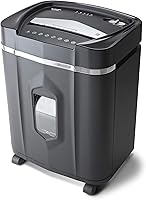
Paper Shredder Run Time and Cool-Down, Explained
A shredder's continuous run time is the maximum time it can shred before cooling; stop when its manual or overheat light tells you to. A longer run time suits large batches, but sheet capacity and cool-down time also affect the job.
On this page (9 sections)
- What does paper shredder continuous run time mean?
- Does a longer run time mean a faster shredder?
- How do run time and cool-down work together?
- What happens when a shredder overheats?
- How can you reduce overheating during a shredding session?
- How do you choose a shredder for your workload?
- Can you run a shredder for its full rated time?
- What should you do if the shredder stops early?
- Which shredder run time should you choose?
A shredder's continuous run time is the maximum time it can shred before cooling; stop when its manual or overheat light tells you to. A longer run time helps with large batches, but sheet capacity and cool-down time also affect how long the whole job takes.
Run time is not the same as speed. It describes how long the motor is designed to operate before resting, while sheet capacity describes how much paper the machine can take in one pass.
What does paper shredder continuous run time mean?
Continuous run time is the maker's stated operating window before a rest or cool-down. A shredder rated for 10 minutes, for example, may need a break after that period, even if you still have papers to destroy.
The rating doesn't promise that every load will run for that full period without stopping. Feeding thick stacks, reaching the sheet limit repeatedly, or clearing jams can affect how the machine behaves.
Also check what the maker says about cool-down. A shredder with a 60-minute run time may still need a substantial break before the next batch.
Does a longer run time mean a faster shredder?
No. Run time measures duration, not shredding speed.
A long-duty shredder may keep operating longer, but the amount it processes per minute also depends on feeding pace and how many sheets it accepts at once.
The Bonsaii 18-Sheet Cross-Cut 60-Minute Shredder accepts up to 18 letter-size sheets of 20 lb paper per pass and has a stated 60-minute run time. Bonsaii says it needs 10 minutes to cool before working again.
Use the capacity and load guidance in the manual. Don't push extra sheets through to save time.
For help choosing a machine around your workload, see our paper shredder buying guide.
How do run time and cool-down work together?
The run time and cool-down period determine the full work-and-rest cycle. A machine that runs for a long time can still take a while to finish a second batch if its required break is long.
Bonsaii says the Bonsaii 15-Sheet Cross-Cut 40-Minute Shredder can run for up to 40 minutes, then needs 40 minutes to cool before the next run. It can also stop sooner if its overheat protection activates.
This makes the cool-down detail as important as the headline duration. If you have several batches to process, the waiting period may shape your schedule more than the advertised run time.
What happens when a shredder overheats?
An overheated shredder may stop automatically and show an indicator light. Give it time to cool, and check the manual before switching it back on.
A thermal stop is a protective feature, not a signal to force the machine to keep running. Avoid repeatedly restarting it while hot, since that can add strain and delay the job.
The Aurora AU1210MA 12-Sheet Micro-Cut Shredder has a stated 60-minute continuous run time and indicator lights for overheat, overload, bin-full, standby, and door-open status. It accepts up to 12 sheets per pass.
If the shredder stops early, check for an overload, full bin, open door, or jam. The guide to using a paper shredder covers feeding and basic operation.
How can you reduce overheating during a shredding session?
Feed paper within the machine's stated sheet capacity and stop when it signals a problem. A steady pace and a clear bin can help avoid needless interruptions.
Don't force paper into the slot or feed another stack while the previous one is still being pulled in. If the machine reverses or stops, follow the manual's steps instead of repeatedly switching modes.
The Bonsen 16-Sheet 60-Minute Cross-Cut Shredder accepts up to 16 sheets per pass and has a stated 60-minute continuous run time. BONSEN lists overheat and overload protection, plus an automatic reverse function.
Let the motor cool naturally if the shredder trips its protection. Don't cover vents or place the machine where its manual says airflow may be restricted.
Shredding oil and cleaning can help with upkeep, but they don't extend a maker's rated duty cycle. See how to clean a paper shredder for routine care, and follow the manual for oiling guidance.
How do you choose a shredder for your workload?
Choose based on the size of your usual batches, the run time, and the cool-down period together. A long run time can be useful for office cleanouts, while a shorter duty cycle may be enough for occasional mail and paperwork.
Compare the products by the job you need to do:
- Bonsaii 18-Sheet Cross-Cut 60-Minute Shredder: up to 18 letter-size sheets of 20 lb paper per pass, with a stated 60-minute run time and 10-minute cool-down.
- Aurora AU1210MA 12-Sheet Micro-Cut Shredder: up to 12 sheets per pass and a stated 60-minute run time.
- Bonsen 16-Sheet 60-Minute Cross-Cut Shredder: up to 16 sheets per pass and a stated 60-minute run time.
- Bonsaii 15-Sheet Cross-Cut 40-Minute Shredder: up to 15 sheets per pass and a stated 40-minute run time, with a stated 40-minute cool-down.
These figures come from the brands, and actual use should follow each machine's instructions. To compare other features such as cut style and paper capacity, read what to consider when buying a paper shredder.
Can you run a shredder for its full rated time?
Only if the manual allows it and the machine remains within its operating limits. The stated duration is not a reason to ignore an overheat light, overload warning, jam, or change in sound.
Some brands calculate a paper total based on uninterrupted shredding at a stated pace. Treat those totals as estimates from the brand, not a promise that every user will shred that amount in the same time.
Keep the bin from filling past its mark, and stop if paper backs up in the feed opening. If a jam occurs, follow the model's safe clearing instructions before resuming.
What should you do if the shredder stops early?
Check the warning lights and the manual before restarting. The cause may be heat, an overloaded feed, a full bin, an open basket, or a jam.
Switch the machine off and unplug it before inspecting or clearing paper if the instructions require it. Keep hands and tools away from the cutters unless the manual gives a safe procedure.
Don't use sharpening sheets or oil to solve an overheat warning. Those are maintenance steps for the cutter, not a substitute for cooling; our guide explains when shredder sharpening is useful.
Which shredder run time should you choose?
For a few pages at a time, prioritize a machine whose capacity and duty cycle match your routine, rather than choosing the largest run-time number. For large scheduled batches, compare both the stated run time and the cool-down period.
The 60-minute models here suit longer sessions on paper, while the Bonsaii 15-Sheet model pairs a 40-minute run time with a 40-minute rest. Check each model's manual for the exact operating limits, then use our paper shredder buying guide to weigh run time against capacity and cut type.
Frequently asked questions
What does continuous run time mean on a paper shredder?
Continuous run time is the maker's stated maximum operating period before a shredder needs a rest or cool-down. It doesn't mean the machine can run without interruption under every load; sheet thickness, feeding pace, jams, and the instructions all matter.
Check the manual for the rest period and warning lights.
How long should a paper shredder cool down?
Cool-down time depends on the model, so follow its manual and overheat indicator. Some makers specify a fixed rest period, while others tell you to wait until the warning light clears.
Turn the machine off and let it cool naturally; don't restart it repeatedly while it is hot.
Can a paper shredder overheat before its run-time limit?
Yes. A stated run time is a limit, not a guarantee that every load will finish without heat protection activating.
Overloading, repeated feeding, a jam, or blocked airflow may cause a shredder to stop sooner.
Follow the manual, clear only safe jams, and let the motor cool before restarting.
Is a 60-minute shredder better for home use?
A 60-minute rating can help if you regularly have a large batch to shred, but it may be more run time than a small household needs. Compare the cool-down period, sheet capacity, bin size, and the amount you usually shred.
A shorter-duty model may suit occasional paperwork.