Cross Cut vs Strip Cut Shredders: Which Should You Buy? (October 2026)
For the cross cut vs strip cut shredder choice, pick cross cut for smaller pieces and strip cut for routine papers. Then compare the security level, capacity and runtime of the specific model.
On this page (8 sections)
- Cross cut vs strip cut shredder: how do the cuts differ?
- Which cut style suits your home or office?
- How do capacity and runtime change the buying decision?
- What setup and care help a shredder run smoothly?
- What mistakes should you avoid when comparing shredders?
- Which extra features matter beyond the cut?
- Cross cut vs strip cut shredder: which one should you buy?
- External references
For the cross cut vs strip cut shredder decision, choose cross cut for smaller pieces and strip cut for routine paper disposal. Match the model's stated security level to your documents, then check whether its capacity and runtime fit the amount you shred.
Strip-cut shredders slice paper into long strips. Cross-cut shredders also cut across the strips, leaving smaller pieces.
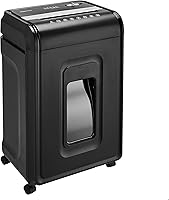
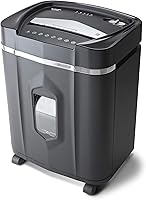
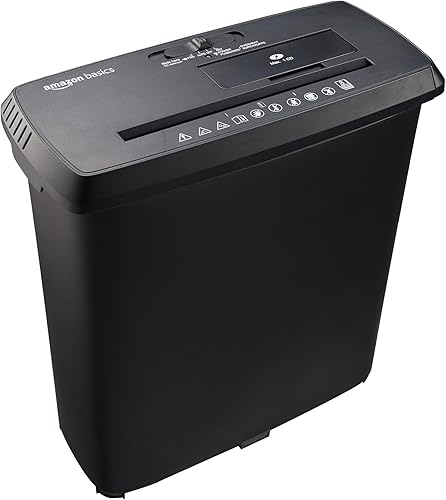
Among the 3 Amazon Basics options here, the strip-cut model is P-2, while the cross-cut models are P-3 and P-4. They all handle ordinary paper, but their capacity, bin size and work intervals differ.
 Best for private paperwork
Amazon Basics 8-Sheet P-4 Cross-Cut Shredder
Cross cut vs strip cut shredder: how do the cuts differ?
Strip cut leaves long strips, while cross cut produces smaller pieces by cutting in two directions. That difference affects how much the original page is broken up, so the cut style should reflect the sensitivity of the papers you discard.
The 8-sheet strip-cut option makes strips 0.24 in wide and is P-2. The 8-sheet cross-cut model makes pieces about 0.2 x 0.7 in and is P-4, while the 12-sheet cross-cut model makes pieces about 0.2 x 1.2 in and is P-3.
These security levels apply to these specific models. The name of a cut style alone doesn't tell you the security level of every shredder.
For more detail on the cut style, see what a cross-cut shredder is and who needs one.
How should cross cut vs strip cut security guide your choice?
Use the stated security level as a buying filter, then choose according to the sensitivity of your paperwork. If your workplace or document-handling policy sets a minimum, follow that requirement before comparing other features.
For routine paper you mainly want to keep from being read at a glance, P-2 strip cut may be enough. For papers with personal or financial details, the smaller output and higher stated level of a cross-cut option make it the stronger fit in this selection.
The 8-sheet cross-cut model is P-4, and the 12-sheet model is P-3. If you need a cut smaller than cross cut, our guide to micro cut vs cross cut shredders explains that comparison.
Which cut style suits your home or office?
Choose strip cut for routine disposal, P-4 cross cut for more private papers, and the 12-sheet cross-cut model when you process bigger batches. The right choice depends on what you shred most often, not just the name printed on the box.
A household that mostly discards general mail and non-sensitive forms may prefer a simple strip-cut option. If you regularly dispose of paperwork with account or identity details, cross cut is the better direction to explore.
In a home office, estimate the size of a typical session. A short stack once a week may fit an 8-sheet model, while recurring paperwork may make the larger capacity and longer runtime of the 12-sheet option more useful.
For a broader comparison of cut types, security and buying priorities, use our paper shredder buying guide.
When is strip cut enough, and who should skip it?
Strip cut makes sense when your papers are routine and P-2 is suitable for your needs. Its 8-sheet capacity and shorter cooldown can work for occasional household or office disposal.
This model also handles staples and small paper clips with paper, plus CDs, DVDs and credit cards one at a time. Credit cards must not be metal, and you should check the manual before shredding anything beyond ordinary paper.
Skip strip cut if you want smaller output pieces or need a higher stated security level. The cross-cut paper shredders for home use guide can help if you already know you prefer that format.
Who should choose cross cut?
Choose cross cut when smaller pieces matter for the papers you discard. The 8-sheet P-4 model fits shoppers who prioritize the highest stated security level among these three, while the 12-sheet P-3 model suits people who want a larger capacity and longer work interval.
The 8-sheet P-4 shredder handles up to 8 sheets at a time, runs for 3 minutes and then needs a 30-minute cooldown. The 12-sheet P-3 option handles up to 12 sheets, runs for 9 minutes and also needs 30 minutes to cool.
Don't assume every cross-cut model has the same security or capacity. Compare those details on the specific option that fits your needs.
How do capacity and runtime change the buying decision?
Pick a sheet capacity that covers your usual batch, then check the runtime and cooldown against how you plan to work. Capacity tells you how many sheets the shredder can handle at a time, while runtime limits how long you can keep feeding paper before a rest.
Each model's stated capacity applies to paper weighing 20 lb per sheet. The strip-cut and 8-sheet cross-cut options handle up to 8 sheets at a time.
The 12-sheet cross-cut model handles up to 12.
That limit isn't an ideal target for every feed. When paper is thick, folded or uneven, smaller batches are a sensible way to avoid forcing the feeder.
Follow the manual for the model's feeding instructions.
Runtime may matter more than sheet capacity if you save paperwork for one large session. The strip-cut model runs for 2.5 minutes, the 8-sheet cross-cut for 3 minutes and the 12-sheet cross-cut for 9 minutes.
Their cooldowns are 15, 30 and 30 minutes respectively.
For a clearer way to schedule a shredding session, read paper shredder runtime and cooldown explained. If your routine involves small stacks, the shorter runtime may be enough; a backlog points toward more capacity and a longer working interval.
What setup and care help a shredder run smoothly?
Set the shredder on a stable, dry surface near an outlet, leave room to remove its bin, and read the manual before the first feed. A little setup makes it easier to use the controls correctly and empty the bin without scattering scraps.
Keep the shredder away from aerosol products. Both cross-cut models have auto/on, off, reverse and forward settings, plus status lights for power, overheat and overload.
The strip-cut model uses automatic start-stop operation.
Start with a small batch of plain paper to learn how the feed works, then stay within the sheet limit. Keep fingers, loose clothing and other objects clear of the feed opening, and switch off the machine before clearing a jam or emptying the bin.
Empty the bin before scraps reach the cutter area. If paper begins to back up, stop feeding and use the controls as described in the manual.
Don't keep pushing a stuck stack into the opening.
What mistakes should you avoid when comparing shredders?
The most common mistake is choosing by cut name alone. Check the stated security level, sheet capacity, runtime and accepted materials for the exact model.
Another mistake is treating the maximum sheet count as the right amount for every feed. The 8-sheet and 12-sheet limits are for 20 lb bond paper, so don't assume the same limit applies to cards or other materials.
Don't ignore cooldown time when you have a backlog. A shredder that runs longer can reduce interruptions during the session, but it still needs the full rest period stated for its model.
Finally, don't put metal credit cards through these options. Their stated card support is for one card at a time, and all three exclude metal cards.
Which extra features matter beyond the cut?
Compare the bin size and controls after you settle on an acceptable cut style. A larger bin can mean fewer interruptions to empty it, while clear controls make it easier to respond to overload or overheating.
The strip-cut model has a 3.4-gallon bin. The 8-sheet cross-cut option has a 3.7-gallon bin, and the 12-sheet model has a 5-gallon bin.
The cross-cut models also have LED indicators for power, overheat and overload. Their automatic shutoff helps protect against overheating when the maximum runtime is exceeded.
Each model's controls and safety steps are covered in its manual.
All three accept credit cards one at a time, but none is suitable for metal credit cards. The strip-cut model also handles CDs and DVDs, a useful distinction if you need to dispose of those media types.
Cross cut vs strip cut shredder: which one should you buy?
Choose the strip-cut shredder for routine papers when P-2 meets your needs, the 8-sheet P-4 cross cut for more private paperwork, or the 12-sheet P-3 cross cut for larger batches. Make the decision by matching security first, then capacity, runtime and bin size to your actual routine.
Skip the strip-cut option if you want smaller pieces or a higher stated security level. Skip the 8-sheet cross-cut option if a 3-minute work interval would make your usual session inconvenient.
The 12-sheet model offers the longest runtime here, but still requires a 30-minute cooldown.
If you want to compare more types and features before choosing, start with the paper shredder buying guide. For shoppers who have already decided on cross cut, see the cross-cut shredder options for home use.
External references
For context on information security levels and data media destruction, see the DIN 66399 information from the DIN Standards Committee.
Frequently asked questions
Is cross cut more secure than strip cut?
These models have different stated security levels. The 8-sheet cross-cut model is P-4, the 12-sheet cross-cut model is P-3, and the strip-cut model is P-2.
Compare the level of the exact shredder you plan to buy, and match it to your documents and any workplace rules.
Is a strip-cut shredder good enough for home use?
A strip-cut shredder can suit routine household paperwork that doesn't need a higher stated security level. This 8-sheet Amazon Basics model is P-2 and makes 0.24-inch-wide strips.
For paperwork with personal details, consider a cross-cut model with a higher stated level.
Can cross-cut shredders handle more sheets?
Cut style alone doesn't determine sheet capacity. The 8-sheet cross-cut model handles up to 8 sheets, while the 12-sheet cross-cut model handles up to 12.
The strip-cut option also handles up to 8 sheets of 20-pound bond paper, so compare the model's limit with your usual batch.
Which shredder has the longest runtime?
Among these 3 models, the 12-sheet cross-cut shredder has the longest stated runtime at 9 minutes, followed by 3 minutes for the 8-sheet cross-cut and 2.5 minutes for the strip-cut. Each needs a cool-down period, so plan your work around both times.
Can these shredders shred credit cards?
All 3 models handle credit cards one at a time, but none is suitable for metal credit cards. Follow the manual for the exact model and item, since a shredder's stated paper capacity doesn't apply to cards or other materials.