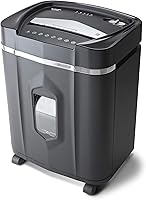
Fellowes Powershred LX220 Micro-Cut Review: Worth It? (October 2026)
The Fellowes LX220 suits frequent shredding of confidential paper, with 20-sheet manual feeding, P-4 micro-cut output and a 30-minute run window. Choose it for larger hand-fed batches; pick the Aurora for auto-feed or the Bonsaii for smaller jobs.
On this page (11 sections)
- What does the Fellowes LX220 offer?
- Who should buy the Fellowes LX220?
- Is the LX220's capacity right for your workload?
- How does the LX220 compare with the Aurora and Bonsaii?
- Do the LX220's safety and jam features matter?
- How should you set up and use the LX220?
- What common mistakes should you avoid?
- How long can the LX220 shred?
- What should you know about the bin and placement?
- Is the Fellowes LX220 worth considering?
- Which Fellowes LX220 alternative should you choose?
The Fellowes LX220 is a strong fit for frequent, confidential paper shredding when you want to feed larger stacks by hand. It combines P-4 micro-cut output with a stated 30-minute run window, making it a practical choice for recurring home-office paperwork.
Its main advantage is capacity, not hands-free operation. Choose the Aurora AU120MA if you want to load a stack for auto-feeding, or the Bonsaii if its smaller capacity better fits your routine and space.
What does the Fellowes LX220 offer?
The LX220 combines 20-sheet manual feeding with P-4 micro-cut shredding. Fellowes also gives it an efficiency meter, jam detection and a sensor that stops shredding when hands or paws touch the paper entry.
Fellowes Powershred LX220 20-Sheet Micro-Cut Shredder: Best for larger paper batches

- 20 sheets per pass
- P-4 micro-cut
- 30-minute run time
- 8-gallon bin
A high-capacity manual-feed micro-cut shredder with jam detection, an efficiency meter and a safety sensor at the paper entry.
Pros
- Shreds up to 20 sheets per pass
- P-4 micro-cut output
- 30-minute continuous run time
- Safe Sense stops shredding when hands or paws touch the entry
Cons
- Requires manual feeding
- Needs a 15-minute cool-down after its stated 30-minute run
Its 8-gallon bin holds more than the 5-gallon Aurora and 4.2-gallon Bonsaii bins. The white, corded shredder measures 16.5 in deep, 11.75 in wide and 23.25 in high, so allow room for both the machine and access to its collection bin.
What does P-4 micro-cut mean for the Fellowes LX220?
P-4 micro-cut is the LX220's stated security level for reducing documents to small particles. Fellowes describes about 1,257 particles per sheet, which makes this model a fit for confidential paperwork that needs more protection than basic strip-cut output.
Security level is only one part of document disposal. Follow your workplace's retention rules, and shred papers only after you are allowed to discard them.
Our guide to micro-cut versus cross-cut shredders explains the practical differences between those cut types. For a wider comparison of cut patterns, see cross-cut versus strip-cut shredders.
Who should buy the Fellowes LX220?
Buy the LX220 if you regularly work through paper stacks, want micro-cut output and prefer to feed pages yourself. Its 20-sheet capacity and larger bin suit a home office or shared workspace where paper accumulates between shredding sessions.
It also fits buyers who want a longer stated run window for a backlog. Safe Sense adds a useful response at the paper entry in homes where hands or paws might come near the machine, though safe placement and supervision still matter.
Skip it if you mainly shred a few pages at a time, need an auto-feed tray, or have little room for a full-size shredder. A smaller model may be easier to place, while the Aurora is the clearer choice for unattended stack feeding.
Is the LX220's capacity right for your workload?
The 20-sheet rating favors larger manual batches. It can mean fewer separate feeds than the Bonsaii, which is rated for up to 12 sheets per pass, but your actual workflow also depends on how often you shred and how neatly you prepare each stack.
The LX220's Efficiency Meter indicates the potential for increased sheet capacity in real time. Use it as a guide while feeding paper, not as a reason to force an uneven stack or ignore a warning.
Fellowes describes the 100% Jam Proof System as detecting and powering through tough jobs. That feature can help with difficult feeds, but careful loading and following the manual remain the sensible way to reduce interruptions.
For more help deciding between feed styles and capacities, use the paper shredder buying guide. It can help you match a shredder to your document volume and the space where you plan to use it.
How does the LX220 compare with the Aurora and Bonsaii?
The LX220 has the largest stated manual-feed capacity here, while the Aurora is the only model in this comparison with auto-feed. All three make P-4 micro-cut output, so your decision mainly comes down to how you feed, how much you shred at once and how much bin space you want.
| Model | Feed capacity | Run time | Bin capacity | Notable features |
|---|---|---|---|---|
| Fellowes Powershred LX220 | 20 sheets per pass | Up to 30 minutes, then 15-minute cool-down | 8 gallons | Jam Proof System, Efficiency Meter, Safe Sense |
| Aurora AU120MA | 120 sheets auto-feed; 10 sheets manual | 30 minutes | 5 gallons | Auto reverse, overload protection, status lights |
| Bonsaii 12-Sheet Micro-Cut | 12 sheets per pass | Up to 20 minutes | 4.2 gallons | Overload protection, casters, visible bin window |
Pick the LX220 for larger hand-fed batches and a larger collection bin. The Aurora suits people who want to load a stack and let the machine feed it, while the Bonsaii makes more sense when its lower capacity, shorter run window and casters fit the job.
For other Fellowes options, browse Fellowes paper shredders. The Fellowes 99Ci review covers another model in the range.
Do the LX220's safety and jam features matter?
The LX220's Safe Sense feature stops shredding when hands or paws touch the paper entry, according to Fellowes. It can be useful in a shared home or office, but it does not replace supervision or careful placement around children and pets.
The Jam Proof System addresses difficult feeds, while the Efficiency Meter helps you manage the amount of paper you feed. These features serve different purposes, so use the sensor as a safety feature and the meter as a loading guide.
Before first use, read the manual and learn the controls, feed limits and approved materials. Keep the entry clear, place the shredder where the bin can be removed easily, and follow the manual's directions if a jam or warning occurs.
How should you set up and use the LX220?
Set the LX220 on a stable, accessible spot near a suitable outlet, with enough clearance to feed paper and remove the bin. Measure the location before bringing it home, including the route through doorways and around furniture.
For a first run, start with a small, neat stack and watch how the machine responds. Add pages gradually, using the Efficiency Meter and the stated capacity as guides rather than pushing a crooked or oversized stack into the entry.
The LX220 can also shred staples, paper clips and credit cards. Check the manual for feed instructions before putting those materials through, and keep other materials out unless Fellowes specifies that they are supported.
What common mistakes should you avoid?
The most common mistake is treating the maximum sheet count as a target for every feed. Paper thickness, folds and a badly aligned stack can make feeding harder, so keep pages flat and stop if the machine signals a problem.
Another mistake is assuming the Jam Proof feature makes careful loading unnecessary. Use the meter, follow the manual and avoid forcing material into the paper entry.
Don't plan a long job around uninterrupted operation. Fellowes specifies a 30-minute run followed by a 15-minute cool-down, so divide a large backlog into sessions and let the shredder rest when needed.
How long can the LX220 shred?
Fellowes specifies up to 30 minutes of continuous shredding, followed by a 15-minute cool-down. This is longer than the Bonsaii's stated 20-minute run and matches the Aurora's stated 30-minute run.
A long run window helps with a backlog, but each job will vary with the amount and type of paper. Plan for a pause if the shredder reaches its cool-down period; don't treat the maximum run time as a promise that every pile will take the same time.
The shredder run-time guide explains how to plan jobs around run periods and cool-downs.
What should you know about the bin and placement?
The LX220's 8-gallon bin is the largest of these three models. It can reduce how often you stop to empty the collection bin, but the shredder itself needs enough room for its listed dimensions and for bin access.
Measure the floor area and route into the room before buying. Its height is 23.25 in, width 11.75 in and depth 16.5 in, so check nearby doors, shelves and furniture as well as the spot where it will sit.
The Bonsaii includes casters, while the LX220's listed features don't specify wheels. If you'll need to move the Fellowes often, consider the path and placement before setting it up.
Is the Fellowes LX220 worth considering?
The LX220 is worth considering if you regularly feed large paper stacks by hand and want P-4 output, a bigger bin and a 30-minute run window. Its jam and safety features add useful support for recurring paperwork, while its size and manual feed make it less suited to very small spaces or hands-free jobs.
Choose the Aurora if loading a stack for auto-feed matters most. Choose the Bonsaii if a smaller-capacity shredder is enough; compare the best micro-cut shredders for home use if you want more options.
Which Fellowes LX220 alternative should you choose?
Choose the Fellowes LX220 for larger hand-fed batches, the Aurora for auto-feeding up to 120 sheets, or the Bonsaii for a smaller-capacity model with casters. Match the feed style and bin size to your actual routine, then check the manual for operating limits and permitted materials.
For more context on the brand, read Is Fellowes a good shredder brand?. The LX220 is the clear choice here when manual capacity is your priority; pick another model when auto-feed or a smaller footprint matters more.
Source: Fellowes LX220 product details
Frequently asked questions
How many sheets can the Fellowes LX220 shred at once?
The Fellowes LX220 is rated for up to 20 sheets of paper per pass. Its Efficiency Meter indicates the potential for increased sheet capacity in real time, but feed a neat stack and follow the manual if the machine signals a problem.
What security level is the Fellowes LX220?
The LX220 is a P-4 micro-cut shredder. Fellowes describes its output as about 1,257 particles per sheet, a fit for confidential paperwork; choose the security level that matches your workplace rules and the sensitivity of the papers you discard.
How long can the LX220 run before cooling down?
Fellowes specifies up to 30 minutes of continuous shredding followed by a 15-minute cool-down period. If your workload regularly fills that window, split the job into batches and allow the cool-down instead of trying to keep the machine running.
Can the Fellowes LX220 shred credit cards and staples?
The LX220 can shred staples, paper clips and plastic credit cards, along with paper. Check the manual for the correct feed method and any limits, and don't assume it accepts other materials unless Fellowes names them.