Aurora AU1210MA Micro-Cut Shredder Review: Worth It? (October 2026)
The Aurora AU1210MA is a 12-sheet P-4 micro-cut shredder with a stated 60-minute continuous run time. Choose it for frequent paper and media disposal when you have room for its 5-gallon pullout bin and 22.4 lb frame.
On this page (10 sections)
- What does the Aurora AU1210MA offer?
- How long can you shred before taking a break?
- What size and setup does the AU1210MA need?
- Is micro-cut the right choice for your papers?
- What can the Aurora AU1210MA shred?
- How does the Aurora AU1210MA compare with the AU1225MA?
- How do other 12-sheet micro-cut shredders compare?
- How should you use and care for the AU1210MA?
- Should you buy the Aurora AU1210MA?
- How we scored the AU1210MA
The Aurora AU1210MA is a 12-sheet P-4 micro-cut shredder with a stated 60-minute continuous run time. It fits people who regularly clear paperwork in substantial batches and have room for its 5-gallon bin and 22.4 lb frame.
Its ability to handle paper, small paper clips, CDs, DVDs and credit cards adds flexibility for a home office. Before choosing it, plan where it will sit and make sure you can pull out the bin without moving other furniture.
What does the Aurora AU1210MA offer?
The Aurora AU1210MA combines a 12-sheet capacity with a long stated run time and P-4 micro-cut output. It's built for a steady paper backlog, with a pullout bin and status lights to make routine use easier to manage.
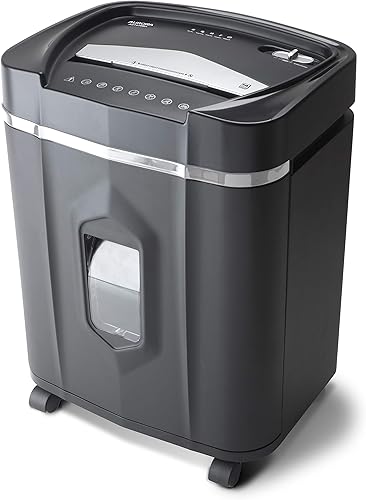
Aurora AU1210MA 12-Sheet Micro-Cut Shredder: Best for large batches
- 12-sheet capacity
- 60-minute continuous run time
- 5-gallon pullout bin
- P-4 micro-cut
A high-capacity micro-cut model with a long stated run time and a pullout bin. Its size and weight suit a planned home office spot better than frequent lifting.
Pros
- 12-sheet capacity
- 60-minute continuous run time
- P-4 micro-cut
- Pullout bin with status lights
Cons
- 22.4 lb weight may make moving it harder
- 5-gallon bin still needs regular emptying
The AU1210MA cuts paper into pieces measuring 5/32 by 15/32 in. That size and its P-4 rating suit personal records with account or identity details when you want smaller particles than strip-cut shredding produces.
Who should choose the Aurora AU1210MA micro-cut shredder?
Choose it if you have recurring paperwork to destroy, such as household records, forms or office files, and prefer to process them in longer sessions. It also makes sense if you want one machine that accepts paper and the other media Aurora specifies.
Skip it if you only shred a few pages now and then, have very little floor space, or need to move the shredder often. Its size and weight are easier to accommodate when you can leave it in a stable, planned spot.
How long can you shred before taking a break?
The AU1210MA has a stated continuous run time of 60 minutes, longer than the three comparison models below. That can help when you're clearing accumulated paperwork, but run time doesn't remove the need to watch the machine and empty its bin.
| Model | Stated run time | Bin capacity |
|---|---|---|
| Aurora AU1210MA | 60 minutes continuous | 5 gallons |
| Aurora AU1225MA | 40 minutes continuous | 5 gallons |
| Amazon Basics 12-Sheet Micro-Cut | 20 minutes, then 20-minute cooldown | 6 gallons |
| Bonsaii 12-Sheet Micro-Cut | Up to 20 minutes continuous | 4.2 gallons |
A longer session is useful only if your workspace and disposal routine can keep up. Stop when the machine signals overload, overheating, a full bin or an open door, and follow its manual before continuing.
For a practical way to plan batches and pauses, see our guide to paper shredder run time and cool-down.
What size and setup does the AU1210MA need?
The AU1210MA measures 14.41 in wide, 11.02 in deep and 19.33 in high. Its 5-gallon pullout bin needs enough clearance to slide out, and the machine weighs 22.4 lb, so choose a location you won't need to change often.
Before bringing it into the room, measure the spot and the path through doorways. Leave room around the shredder to load paper and remove the waste bin without blocking a walkway or outlet.
Set it on a stable, level surface near a suitable power outlet. Keep the feed opening clear, and avoid placing the machine where children or pets can reach the opening or loose shredded material.
Is micro-cut the right choice for your papers?
P-4 micro-cut output makes smaller pieces than strip-cut shredding and suits documents with personal or account details. If most of your papers are low sensitivity, a less secure cut type may meet your needs with a different balance of speed and particle size.
Micro-cut pieces can pack differently from long strips, so don't judge emptying frequency by the number of pages alone. Match the cut type to the information you handle, then consider run time, bin size and where you'll keep the machine.
Compare the trade-offs in our guide to micro-cut versus cross-cut shredders. For broader help choosing capacity and security, use the paper shredder buying guide.
What can the Aurora AU1210MA shred?
The AU1210MA handles paper, small paper clips, CDs, DVDs and credit cards. Follow the manual's instructions for feeding non-paper items, since their handling may differ from ordinary sheets.
Don't infer what another model can shred from its cut type or sheet capacity. Our guide to shredding credit cards and staples explains why checking model-specific directions matters.
Keep fingers, clothing and loose items away from the feed opening, and don't push material through when the shredder is signaling overload. Remove staples or clips unless the manual specifically allows them; this model is specified for small paper clips, but that doesn't mean every fastener is suitable.
How does the Aurora AU1210MA compare with the AU1225MA?
The AU1210MA provides 20 more minutes of stated continuous run time than the AU1225MA, while both offer 12-sheet capacity and a 5-gallon pullout bin. The AU1225MA may fit better if 40 minutes covers your usual workload and you prefer its stated protection features.
The AU1225MA includes auto start and manual reverse, along with thermal and overload protection and automatic shutoff. Aurora backs it with a 1-year limited warranty.
Pick the AU1210MA when you expect longer sessions and can use that extra run time. Choose the AU1225MA if your sessions are shorter and the shared capacity and bin size matter more than the maximum run time.
How do other 12-sheet micro-cut shredders compare?
The AU1210MA leads this group on stated run time, while other models trade shorter sessions for a different bin size or setup. The right comparison depends on how much paper you usually process at once and how often you want to empty the bin.
The Amazon Basics model has a 6-gallon bin, the largest here, with a 20-minute run time followed by a 20-minute cooldown. The Bonsaii model has a 4.2-gallon bin and runs continuously for up to 20 minutes.
How should you use and care for the AU1210MA?
Start with the manual, keep the bin seated, and feed paper within the machine's stated sheet capacity. The anti-jam auto-reverse and indicator lights can help with common issues, but they don't replace careful loading or regular emptying.
Feed a neat stack rather than a loose, uneven wad. If a jam occurs, let the auto-reverse work as directed instead of pulling material toward the cutters by hand; stop if the machine signals a problem and consult the manual.
Avoid a common mistake: treating the 12-sheet capacity as a target for every feed. Paper thickness, folds and mixed materials can change how a stack behaves, so use the manual's guidance and reduce the load if the machine signals overload.
Empty the bin when the full indicator appears, and use the care method Aurora recommends for the cutters. Our guide to how to clean a paper shredder covers general cleaning and upkeep steps.
Should you buy the Aurora AU1210MA?
Buy the Aurora AU1210MA if your regular workload benefits from a long stated run time, P-4 micro-cut output and a machine that can also shred the specified media. It makes the most sense in a home office with a permanent spot and room to remove the bin.
Choose the AU1225MA for shorter sessions, the Amazon Basics model if bin size is your priority, or the Bonsaii for a smaller bin and shorter batches. Compare the best Aurora paper shredders if you're still weighing the brand's options.
How we scored the AU1210MA
The AU1210MA scores 8.5 for pairing 12-sheet capacity and P-4 output with a 60-minute stated run time. Its size and weight make it a less convenient fit for occasional shredding or a workspace where the machine must be moved often.
Frequently asked questions
How many sheets can the Aurora AU1210MA shred at once?
Aurora gives the AU1210MA a capacity of up to 12 sheets at a time. Use the manual's loading instructions and avoid forcing in a thick or uneven stack.
Its micro-cut mechanism makes small pieces rated P-4.
How long can the Aurora AU1210MA run?
Aurora specifies a 60-minute continuous run time for the AU1210MA. Your pace will depend on how much paper you feed and whether you pause to empty the bin or handle a jam.
If an indicator signals overheating, follow the manual before resuming.
Can the Aurora AU1210MA shred credit cards and CDs?
The AU1210MA can shred CDs, DVDs and credit cards as well as paper and small paper clips. Check the manual for the correct way to feed each non-paper item and any limits.
Don't assume another shredder accepts the same materials.
How large is the AU1210MA bin?
The AU1210MA has a 5-gallon pullout bin with an indicator for bin-full status. Empty it when needed, even during a long session, so waste does not interfere with normal use.
Keep the bin properly seated and follow the manual when removing or reinstalling it.