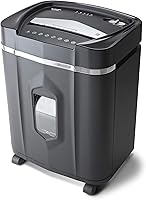
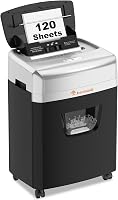
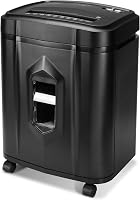
9 Best Paper Shredders That Also Shred Credit Cards (October 2026)
The best paper and card shredders include the Bonsaii 12-Sheet Micro-Cut Shredder for home office privacy, the Bonsaii 12-Sheet Cross-Cut Heavy-Duty Shredder for fewer bin trips, and the Fellowes Powershred 12-Sheet Cross-Cut Shredder for a safety lock.
On this page (4 sections)
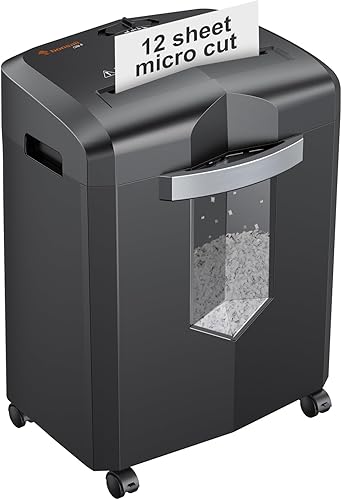
The Bonsaii 12-Sheet Micro-Cut Shredder is a good starting point if you want a paper and card shredder for routine home office documents and the occasional expired card. Its P-4 micro-cut output and listed card handling fit buyers who value finer paper particles and a straightforward manual feed.
For larger paper stacks, the Amazon Basics 18-sheet model has the highest stated manual capacity here and a dedicated card slot. If you'd rather load a paper batch and step away, consider an auto-feed model, keeping in mind that Fellowes specifies manual feeding for cards.
A paper shredder that accepts paper does not automatically accept cards. This roundup covers models whose information includes credit card shredding, but you should follow each machine's card instructions, especially when the material is metallic.
Use our paper shredder buying guide to compare cut styles and security levels. For card-specific feed and material advice, see whether a paper shredder can shred credit cards and staples.
Our picks at a glance
-
1
-
2
 Best for fewer bin trips
Bonsaii 12-Sheet Cross-Cut Heavy-Duty Shredder
8.4/10 our score
See it on Amazon -
3
 Best for a safety lock
Fellowes Powershred 12-Sheet Cross-Cut Shredder
8.1/10 our score
See it on Amazon
- 4
 Check it
Amazon Basics 18-Sheet Cross-Cut Shredder
Best for bigger paper stacks - 5
 Check it
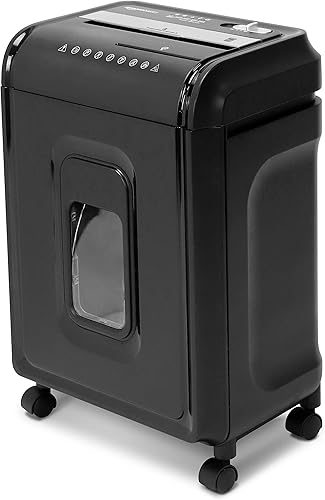
Amazon Basics 12-Sheet Micro-Cut Shredder
Best for micro-cut convenience - 6
 Check it
Aurora AU1260XA 12-Sheet Cross-Cut Shredder
Best for short jam clears - 7
 Check it
Fellowes AutoMax 100MA 100-Sheet Auto-Feed Shredder
Best for unattended paper batches - 8
 Check it
Bonsaii 15-Sheet Cross-Cut Shredder
Best for mid-size sessions - 9
 Check it
Staples 150-Sheet Auto-Feed Micro-Cut Shredder
Best for high-volume feeding
How to choose a paper and card shredder
Choose a paper and card shredder by checking card compatibility first, then matching paper security, batch size, feed style, run time and bin capacity to your routine. A machine that handles cards through a manual slot may be a better fit than auto-feed if you only shred one card now and then.
These nine picks are ordered by score and cover different needs, from finer P-4 paper output to larger paper batches. We compared each model's stated cut type, security level, accepted materials and operating details.
| Product | Best for | Cut type | Security | Paper capacity | Our score |
|---|---|---|---|---|---|
| Bonsaii 12-Sheet Micro-Cut Shredder | home office privacy | Micro-cut | P-4 | 12 sheets per pass | 8.8 |
| Bonsaii 12-Sheet Cross-Cut Heavy-Duty Shredder | fewer bin trips | Cross-cut | P-4 | 8.4 | |
| Fellowes Powershred 12-Sheet Cross-Cut Shredder | a safety lock | Cross-cut | P-4 | 8.1 | |
| Amazon Basics 18-Sheet Cross-Cut Shredder | bigger paper stacks | Cross-cut | P-3 | 18 sheets per pass | 8.0 |
| Amazon Basics 12-Sheet Micro-Cut Shredder | micro-cut convenience | Micro-cut | P-4 | 7.9 | |
| Aurora AU1260XA 12-Sheet Cross-Cut Shredder | short jam clears | Cross-cut | P-4 | 7.8 | |
| Fellowes AutoMax 100MA 100-Sheet Auto-Feed Shredder | unattended paper batches | Micro-cut | P-4 | 7.8 | |
| Bonsaii 15-Sheet Cross-Cut Shredder | mid-size sessions | Cross-cut | P-4 | 7.6 | |
| Staples 150-Sheet Auto-Feed Micro-Cut Shredder | high-volume feeding | Micro-cut | P-4 | 7.5 |
Best paper and card shredders for different buyers
The best option depends on the work you do most often. Use the following distinctions to choose a model that fits your paper load and card disposal habits, rather than paying attention to one spec in isolation.
Bonsaii 12-Sheet Micro-Cut Shredder: Best for home office privacy
- 12 sheets per pass
- P-4 micro-cut
- Credit card shredding
- Up to 20 minutes continuous run
A strong fit if you want P-4 micro-cut paper output and credit card shredding. Bonsaii says it can run continuously for up to 20 minutes.
Pros
- P-4 micro-cut output
- Handles credit cards, staples, paper clips and CDs
- Four casters
Cons
- Check the manual for card feed instructions
Bonsaii's micro-cut model is a strong all-around choice for a home office that handles sensitive paperwork and occasional cards. It also accepts staples, paper clips and CDs, so you can use one machine for several common disposal jobs.
It has a visible bin window and four casters, which help when you need to check fill level or move the unit between storage and a desk. The overload protection and automatic start-stop support routine use, while the stated continuous run time suits a batch of papers better than a brief one-page job.
Choose it if P-4 micro-cut paper output is your main priority and card instructions in the manual match your cards. Skip it if you need an explicitly identified card slot or if most of your work is a very large pile at once.
For other micro-cut options, compare this pick with our best micro-cut shredders for home use.
Bonsaii 12-Sheet Cross-Cut Heavy-Duty Shredder: Best for fewer bin trips
- 12 sheets per pass
- P-4 cross-cut
- Credit card shredding
- 5.5-gallon pull-out bin
This cross-cut option pairs a 12-sheet capacity with a 5.5-gallon pull-out bin. Bonsaii lists credit card shredding, but warns against metallic credit cards.
Pros
- P-4 cross-cut output
- Large pull-out bin
- Up to 15 minutes continuous run
Cons
- Bonsaii warns against metallic credit cards
This Bonsaii cross-cut model suits households that want a roomy pull-out bin and a longer run for regular document clearing. It handles up to 12 sheets per pass and accepts staples, CDs and credit cards.
The window makes it easier to see when the basket needs attention, and the shredder stops when the bin is removed. Auto start-stop and manual reverse give you a way to feed paper and clear a jam, while the stated run time can cover a substantial home paperwork session.
Choose it if you prefer cross-cut output and want fewer interruptions to empty the bin. Skip it if you have metallic credit cards, since Bonsaii warns against those, or if you need a dedicated card slot.
See our cross-cut versus strip-cut comparison for a clearer explanation of how cut styles differ.
Fellowes Powershred 12-Sheet Cross-Cut Shredder: Best for a safety lock
- 12 sheets per pass
- P-4 cross-cut
- Credit card shredding
- Patented safety lock
Fellowes lists credit cards among the materials this shredder can handle. Its safety lock disables the shredder when it is not in use.
Pros
- P-4 cross-cut output
- Safety lock
- Up to 20 minutes continuous run
Cons
- Check the manual for card feed instructions
Fellowes' 12-sheet cross-cut model is a good fit for a deskside setup where a safety lock matters. It handles paper, staples, paper clips, credit cards and unopened junk mail, and its pull-out bin keeps shreds contained.
Its stated run time allows you to finish a modest stack before a cool-down period. The compact footprint is suited to personal deskside use, but Fellowes does not specify a separate card slot in the information here.
Choose it if the safety lock is useful in your workspace and your paper jobs come in manageable batches. Skip it if you need a clearly identified card feed path before you buy; confirm that detail in the manual.
For more everyday alternatives, see our paper shredders for everyday use.
Amazon Basics 18-Sheet Cross-Cut Shredder: Best for bigger paper stacks
- 18 sheets per pass
- P-3 cross-cut
- Dedicated slot for credit cards
- 30 minutes on, 10 minutes off
Its 18-sheet capacity is the largest among these manual-feed picks. Amazon Basics specifies a dedicated slot for credit cards, one at a time.
Pros
- Highest manual paper capacity in this roundup
- Dedicated credit card slot
- Six-gallon bin
Cons
- P-3 security level
The Amazon Basics 18-sheet model is the right manual-feed pick for buyers who regularly clear larger stacks. Its dedicated card slot takes one credit card at a time, so the feed method is clear.
This is a P-3 cross-cut machine, and the paper pieces are larger than the micro-cut output of the P-4 picks. Its six-gallon bin has a window, and casters make it easier to roll the unit when you need to empty or reposition it.
Choose it if paper volume matters more than finer P-4 paper output. Skip it if your documents call for a P-4 security level or if you expect to shred several cards in one pass.
If document security is the deciding factor, compare cut types and levels in our micro-cut versus cross-cut guide.
Amazon Basics 12-Sheet Micro-Cut Shredder: Best for micro-cut convenience
- 12 sheets per pass
- P-4 micro-cut
- Credit card shredding
- 20-minute run time and cool-down
This micro-cut model combines P-4 output with a dedicated slot for credit cards, one at a time. The paper slot can also destroy cards.
Pros
- P-4 micro-cut output
- Dedicated credit card slot
- Six-gallon pull-out bin
Cons
- Needs a 20-minute cool-down after its stated 20-minute run
This Amazon Basics model combines P-4 micro-cut paper output with a dedicated credit card slot. It also allows cards through the paper slot, and accepts CDs and DVDs, as well as paper with small clips or staples.
The six-gallon pull-out bin is useful when you don't want to empty the shredder after every small batch. Its operating cycle is clearly defined, with an equal-length cool-down after its stated run.
Choose it if you want a named card slot and a large bin with micro-cut output. Skip it if your work tends to exceed the stated run cycle or you want a shorter pause between long sessions.
For more options across paper volumes and cut styles, see our best paper shredders for everyday use.
Aurora AU1260XA 12-Sheet Cross-Cut Shredder: Best for short jam clears
- 12 sheets per pass
- P-4 cross-cut
- Credit card shredding
- Auto-reverse
Aurora lists credit cards among the materials it destroys and includes auto-reverse to help clear paper jams. Its continuous run time is 6 minutes.
Pros
- P-4 cross-cut output
- Auto-reverse
- Four-gallon pull-out bin
Cons
- Shortest stated continuous run time in this roundup
Aurora's AU1260XA fits short, occasional shredding jobs where auto-reverse is useful for clearing paper jams. The 12-sheet cross-cut machine handles credit cards, CDs and DVDs, and its indicators report conditions such as overload, overheat and a full bin.
Its four-gallon basket is smaller than several others here, and Aurora states the shortest continuous run in this group. That combination suits a desk or home that shreds a few documents at a time, rather than one large seasonal backlog.
Choose it if you want auto-reverse and usually shred in brief sessions. Skip it if you have long jobs or want a larger basket.
Our guide to using a paper shredder covers sensible feeding and jam prevention habits.
Fellowes AutoMax 100MA 100-Sheet Auto-Feed Shredder: Best for unattended paper batches
- Up to 100 sheets in auto-feed
- P-4 micro-cut
- Credit card shredding through manual feed
- 4.5-gallon bin
Fellowes says the AutoMax can automatically shred up to 100 sheets and lists credit cards for the manual feed opening. It suits batches better than frequent one-page jobs.
Pros
- Auto-feed for up to 100 sheets
- P-4 micro-cut output
- Manual feed also shreds cards, staples and paper clips
Cons
- Card shredding is specified through the manual feed opening
The Fellowes AutoMax 100MA is for buyers who have batches of paper and want to load the auto-feed tray instead of feeding each page by hand. The model also has a manual opening for smaller jobs, including cards, staples and paper clips.
It produces P-4 micro-cut output and has a pull-out bin. Its automatic and manual modes have different run limits, so plan the job around the mode you use.
Choose it if you regularly have paper stacks and can feed cards through the manual opening. Skip it if you want an auto-feed tray to take credit cards too, or if your main use is only a few pages at a time.
For shared workspaces, compare more options in our small office paper shredder guide.
Bonsaii 15-Sheet Cross-Cut Shredder: Best for mid-size sessions
- Up to 15 sheets per pass
- P-4 cross-cut
- Credit card shredding
- 5.5-gallon bin
Bonsaii lists credit cards among the materials this cross-cut model handles and says it can run continuously for 10 minutes. Its bullet says it can take up to 15 sheets per pass.
Pros
- P-4 cross-cut output
- Handles credit cards, staples, clips and CDs/DVDs
- 5.5-gallon bin
Cons
- Capacity details differ between Bonsaii's product fields
This Bonsaii cross-cut model suits buyers who want a mid-size paper batch and a stated 10-minute continuous run. It also accepts cards, staples, paper clips, CDs and DVDs, and includes Auto, Off, Forward and Reverse modes.
The window and built-in handle make it easier to check and empty the wastebasket. The shredder stops when its head is lifted, a useful feature in homes where it may be within reach of children or pets.
Choose it if those controls and the bin size match your routine. Skip it if you need a firm sheet limit or a clearly specified card feed path without checking the manual first, because the stated sheet capacity differs between its details.
Staples 150-Sheet Auto-Feed Micro-Cut Shredder: Best for high-volume feeding
- 150-sheet top-load tray
- P-4 micro-cut
- Credit card shredding
- 7.4-gallon bin
Staples lists credit cards among the materials it shreds and describes a top-load tray for up to 150 sheets. Check the manual for card feed instructions.
Pros
- Largest stated auto-feed capacity here
- P-4 micro-cut output
- 7.4-gallon bin
Cons
- Check the manual for card feed instructions
The Staples auto-feed micro-cut model suits a household or office that has large paper batches and values fewer manual passes. Staples describes a top-load tray for up to 150 sheets, P-4 output and a large pull-out bin.
Its stated details include credit cards, staples and small paper clips, along with auto start-stop, auto reverse and overload protection. However, the card feed method is not specified here, so confirm it before buying if card disposal is a deciding feature.
Choose it if the large paper tray is your priority and you can verify the card instructions. Skip it if you want a named, dedicated card slot right away.
What should you check before using a paper and card shredder?
Before using a paper and card shredder, check the manual for the allowed material, feed path, card orientation, sheet limit and run cycle. These steps help prevent jams and keep you from asking the machine to handle something it was not designed for.
How does a paper and card shredder accept cards?
Some models specify a dedicated card slot or manual opening, while others identify cards as accepted material without describing the feed method. Use a dedicated slot when the instructions call for one, and never assume the automatic paper tray accepts cards.
Amazon Basics identifies a dedicated card slot on both of its models here. Fellowes says cards go through the AutoMax manual feed opening, so they do not belong in its automatic paper tray.
What security level and cut type fit your papers?
For documents with personal or financial information, compare the stated security level along with cut type. Several picks here are P-4, while the Amazon Basics 18-sheet model is P-3.
Micro-cut output is finer than cross-cut output in the P-4 models represented here. If you want a closer look at the difference, read our micro-cut versus cross-cut guide.
How much paper should you feed at once?
Follow the machine's stated sheet limit and avoid forcing extra pages into the opening. Paper weight and folded pages can affect how easily a stack feeds, so leave room rather than packing the throat tightly.
For a large backlog, compare auto-feed capacity with manual-feed capacity. A tray that accepts a large batch of paper does not mean its manual opening accepts the same amount, and cards may require that manual opening.
How do you set up and care for the shredder?
Place the shredder on a stable, level surface near an outlet, with enough room to remove the bin and access the feed opening. Keep the area around the machine clear, and read the manual before the first use so you know the controls and indicator lights.
Empty the bin before it is packed to the rim, and disconnect power before clearing material or cleaning around the cutters. Use only shredder oil and care steps recommended in the manual; ordinary household sprays and aerosols can damage or create risks around the machine.
What common mistakes cause trouble?
Overloading the feed opening, mixing incompatible materials, and ignoring cool-down periods are common ways to interrupt a shredding session. Follow the model's instructions for staples, clips, CDs and cards rather than treating every shredder as interchangeable.
Do not feed metallic cards into a machine that warns against them. Also avoid pulling jammed paper by force while the shredder is powered; use the reverse control only as directed by the manufacturer.
Which paper and card shredder should you choose?
Choose the Bonsaii 12-Sheet Micro-Cut if you want a P-4 home office paper and card shredder for routine papers and occasional cards. Pick the Amazon Basics 18-sheet model for larger manual batches and a dedicated card slot, or choose the Fellowes AutoMax when automatic paper feeding matters most.
For a large pile, compare feed capacity, run cycle and bin size together. For card disposal, prioritize clear instructions on the exact feed path and card material, then follow the manual each time.
If you are still weighing security levels and cut styles, start with our paper shredder buying guide, then choose the model whose card instructions fit the cards you need to destroy.
Our top 3 picks at a glance
-
1
-
2
Best for fewer bin trips
Bonsaii 12-Sheet Cross-Cut Heavy-Duty Shredder
8.4/10 our score
See it on Amazon -
3
Best for a safety lock
Fellowes Powershred 12-Sheet Cross-Cut Shredder
8.1/10 our score
See it on Amazon
Frequently asked questions
Can a paper shredder shred credit cards?
Yes, if the manufacturer says the model accepts credit cards. Follow its instructions for the correct feed opening, card orientation and number of cards per pass.
Some models specify a dedicated slot, while others name cards as accepted material without giving the feed method.
Should you choose cross-cut or micro-cut for credit card shredding?
Both cut types appear in models whose makers list credit card shredding. Micro-cut paper output is finer than cross-cut on the P-4 models here, while cross-cut may suit buyers who prefer that style or want a higher sheet capacity.
Check the shredder's stated security level and card instructions.
Can every shredder take metallic credit cards?
No. Check the instructions for the exact card material before feeding it.
Bonsaii specifically warns against metallic credit cards for its 12-sheet cross-cut model.
If a card is metal or has a metal component, use the issuer's disposal guidance unless the shredder maker clearly permits it.
Do auto-feed shredders shred credit cards automatically?
Not necessarily. Fellowes specifies that the AutoMax 100MA shreds credit cards through its manual feed opening, while its auto-feed tray is for paper.
For the Staples model, the material list names cards but doesn't specify the feed method.
What should you compare when choosing a paper and card shredder?
Compare accepted materials, card feed instructions, paper capacity, cut type, security level, run time and bin size. A model that shreds cards may require a separate slot or manual feed opening.
For a broader decision path, see our paper shredder buying guide.