How Does a Paper Shredder Work?
A paper shredder works by feeding paper between motor-driven cutters, which slice it into strips or smaller particles and drop the pieces into a bin. To choose one, match its cut size, sheet capacity, and run time to your documents and workload.
On this page (8 sections)
- How does a paper shredder work inside?
- What happens to paper as it passes through the cutters?
- What are a shredder’s main parts?
- Why do paper shredders jam or stop?
- How should you choose a shredder based on how it works?
- What setup and care steps help a shredder work well?
- What common mistakes should you avoid?
- Which shredder should you choose?
A paper shredder works by feeding paper between rotating cutters, which slice it into strips or smaller particles and drop the waste into a bin. If you’re asking how does a paper shredder work because you’re choosing one, compare its cut size, sheet capacity, and run time with the documents and workload you have.
The main parts are the feed opening, cutting assembly, motor, controls, and waste bin. The cut style determines the shape and size of the shredded pieces, while the controls manage the machine’s start, stop, and reverse functions.
How does a paper shredder work inside?
A paper shredder uses a motor to turn cutters that grip and cut paper as it passes through. The paper moves from the feed opening through the cutting assembly, then falls into the bin below.
The cutters sit on rotating shafts. Their edges catch the paper and pull it inward, while the motor supplies the force needed to keep them moving.
Some home models start when a sensor detects paper in the opening. Once the paper clears, the machine stops; other switches or sensors may stop it when the bin is removed or the motor needs to cool.
The controls often include an automatic setting and a reverse setting. Reverse turns the cutters backward to help release a jam, but the manual explains when and how to use it.
This process is simple, but a shredder is built for specific limits. Sheet capacity, run time, accepted materials, and cut size all affect which machine fits your routine.
What happens to paper as it passes through the cutters?
The cutters divide paper according to the shredder’s cut type. Strip-cut models make long, narrow strips, while cross-cut and micro-cut models make shorter pieces.
A strip-cut shredder cuts paper into strips along the feed direction. Cross-cut cutters also divide those strips into shorter pieces as the paper passes through.
Micro-cut designs generally make finer particles than cross-cut designs. The actual output depends on the model, so compare the cut dimensions and security level before choosing.
For a closer look at cut style and who may need it, see what a cross-cut shredder is. Our guide to cross-cut vs. strip-cut shredders compares the two common options.
How do paper shredder security levels work?
A P-level classifies shredded paper by its strip width or particle size under a security standard. Higher levels require smaller output, but the number doesn’t tell you how many sheets a shredder can handle at once.
Check the model’s cut type and particle dimensions alongside its P-level. Choose based on the sensitivity of your documents and any disposal requirements that apply to your workplace.
What are a shredder’s main parts?
A shredder’s motor, cutters, feed opening, controls, and bin move paper through the machine and collect the waste. Each part has a separate job.
- Feed opening: guides paper into the cutters.
- Motor: turns the cutter shafts.
- Cutters: grip and cut paper into pieces.
- Sensors and controls: start, stop, or reverse the motor.
- Waste bin: catches shredded material beneath the cutting assembly.
Some models have a visible window or a bin-full indicator. A model may also stop when the bin is pulled out, so make sure it is fully seated before you start.
Keep the shredder on a stable, level surface with enough room to access the feed opening and remove the bin. Check the manual before plugging it in, and keep the cord clear of the wastebasket path.
Switch off and unplug the machine before clearing trapped paper by hand. Don’t spray or store aerosol products in or around a shredder.
Why do paper shredders jam or stop?
A shredder may jam when more paper enters than it can handle in one pass. Uneven feeding, a full bin, or running the motor beyond its stated limits can also interrupt shredding.
Check the sheet capacity and run time for the model, and give the motor its required cool-down period. If paper stops moving, follow the controls and clearing steps in the manual.
A shredder’s reverse setting can help move paper back out of the cutting assembly. Before removing trapped paper by hand, switch off and unplug the machine, and keep fingers and tools away from the cutters.
Avoid forcing folded or bunched sheets through the opening. Feed paper flat, respect the sheet limit, and check the manual before shredding staples, clips, cards, discs, or other materials.
For step-by-step operating advice, read how to use a paper shredder. That guide covers preparing paper, feeding it, and responding to interruptions.
How should you choose a shredder based on how it works?
Match the cut dimensions, sheet capacity, run time, and bin size to the documents and volume you handle. A home user shredding a few papers occasionally has different needs from a shared office with regular jobs.
Start with the cut. Finer particles may suit sensitive paperwork, while cross-cut output may be enough for routine household or office disposal.
Then check how many sheets you’ll usually feed at a time and how long the machine can run. Consider how often you want to empty the bin.
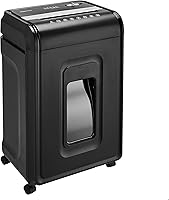
The Bonsaii 12-Sheet Cross-Cut Heavy-Duty Shredder handles up to 12 sheets of Letter-size, 20 lb paper per pass. It cuts paper into 5 x 25 mm particles at P-4 and has a 5.5-gallon pullout bin.
This model may fit a home office that wants a roomy bin and cross-cut output. Skip it if your main priority is the longest work session among these three models, or if you specifically want the finer particles of a micro-cut design.
The Bonsaii 12-Sheet Micro-Cut Shredder handles up to 12 sheets at a time and has a 4.2-gallon pullout bin. Its 5 x 12 mm particles are shorter than the cross-cut Bonsaii’s, though both have a P-4 security level.
Choose this Bonsaii if smaller particles are a priority and you want casters to move the shredder around. Skip it if a larger waste bin or a higher sheet capacity matters more than micro-cut output.
The Fellowes Powershred 99Ci 18-Sheet Jam-Proof Shredder handles up to 18 sheets per pass with P-4 cross-cut output. Its 9-gallon pullout bin includes an LED bin-full indicator.
Choose the Fellowes for a busier home office or shared workspace where fewer bin changes and longer sessions help. Skip it if your shredding is occasional and a smaller machine would better fit your space or workload.
These three machines show how the parts and limits translate into a buying decision. Sheet capacity is a maximum, so follow the manual’s limits for paper and other accepted materials.
Continuous run time also has a limit, so allow the required cool-down period before starting again.
What setup and care steps help a shredder work well?
Good setup and care help a shredder feed paper reliably and keep the work area manageable. Read the manual first, then place the machine where you can feed paper straight and remove the bin safely.
Before a job, check that the wastebasket is seated and that the bin isn’t full. Keep papers flat and aligned with the opening, and feed only the amount the model allows.
Check the manual for the correct feed direction and limits for any accepted non-paper material.
Stop when the shredder signals a jam or overload. Use the reverse control only as instructed.
Don’t pull paper from the cutters while the machine is powered, and unplug it before any manual clearing.
Empty the bin before it becomes tightly packed. Compressed shreds can make removal messy and obstruct the area beneath the cutters.
Keep the outside and feed opening clear, and use only care methods approved in the manual.
If the shredder starts stopping during normal jobs, pause and let it cool as directed. Don’t keep feeding sheets to force a job through.
Smaller batches protect the motor from overload and make it easier to spot a feed problem.
For cleaning details, see how to clean a paper shredder. Follow the instructions for your model, since care steps can vary.
What common mistakes should you avoid?
The most common mistakes are overloading the feed, ignoring run-time limits, and assuming every shredder accepts the same materials. Each can lead to jams, interruptions, or damage.
Don’t treat the maximum sheet capacity as a target for every batch. Thick paper, folded sheets, or uneven feeding can make a full load harder to process, so start below the limit if the pages aren’t feeding smoothly.
Don’t confuse run time with sheet capacity. A model may take many sheets in one pass but still need a cool-down after a set period of work.
Plan a large cleanup around both limits.
Don’t rely on a cut-type label alone to choose security. Compare particle dimensions and P-level, especially when handling sensitive records.
Verify which non-paper materials are accepted; a credit card, staple, clip, or disc should only go through a machine whose manual permits it.
Finally, don’t reach into the feed opening to clear a jam. Switch off and unplug the machine, use the prescribed controls, and follow the manual’s safe clearing steps.
Which shredder should you choose?
Choose the Bonsaii 12-Sheet Micro-Cut Shredder if finer particles and a 20-minute rated run time match your home or small-office use. Pick the Fellowes Powershred 99Ci if you regularly process larger batches and want its higher sheet capacity, longer run time, and larger bin.
Choose the Bonsaii 12-Sheet Cross-Cut Heavy-Duty Shredder if cross-cut output and a 5.5-gallon bin fit your routine. For an occasional user, start with the cut size and batch size you actually need, then avoid paying for capacity you won’t use.
Knowing how does a paper shredder work makes the choice clearer: cutters determine the output, the motor and run-time limit determine how long you can work, and the bin determines how often you stop to empty it. Compare those needs in the paper shredder buying guide, then use the shredder basics guide for related explanations.
Frequently asked questions
How does a paper shredder cut paper?
A motor turns cutters that grip paper at the feed opening and pull it through. Strip-cut models make long strips, while cross-cut and micro-cut models divide those strips into shorter particles.
Compare a model’s cut dimensions and security level when choosing.
Those details describe its output more clearly than the cut-type name by itself.
What makes a paper shredder start and stop automatically?
Many shredders use a sensor near the feed opening to detect paper, start the motor, and stop when the paper clears. Depending on the model, other controls may stop operation when the bin is removed, the motor overheats, or too much paper enters.
Follow your model’s manual for its controls and indicators.
Why does a paper shredder jam?
A jam can happen when too much paper enters at once, paper feeds unevenly, or unsuitable materials reach the cutters. Use reverse only as the manual directs.
Before removing trapped paper by hand, switch off and unplug the shredder.
Keep fingers and tools away from the cutters.
What is the difference between cross-cut and micro-cut shredders?
Cross-cut shredders make short pieces, while micro-cut models generally make finer particles. The names alone don’t tell you the exact particle size or security level.
Compare each model’s cut dimensions and P-level, then choose based on the documents you handle and any disposal requirements that apply to you.