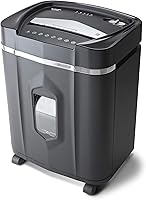
Quiet Paper Shredders: How to Choose a Low-Noise Model
A quiet paper shredder is one whose stated noise level fits your room and routine. Compare noise claims, feed style, and run time, then choose a place where its sound won’t interrupt work.
On this page (8 sections)
- How should you compare quiet paper shredder noise claims?
- Does a lower decibel figure mean a silent shredder?
- Which quiet paper shredder feed style fits your routine?
- How much should run time matter when choosing a quiet shredder?
- Is a micro-cut shredder quieter than a cross-cut model?
- What setup and care can help keep a shredder running smoothly?
- What mistakes make a quiet shredder harder to live with?
- Which quiet paper shredder should you choose?
A quiet paper shredder is one whose stated noise level fits your room and work routine. Compare noise figures, feed style, and run time, then choose a spot where its sound won’t disrupt calls or focused work.
A noise figure is a useful way to narrow choices, but it can’t tell you exactly how a shredder will sound in your room. Distance, walls, paper load, and the machine’s condition all affect how noticeable it is.
How should you compare quiet paper shredder noise claims?
Compare the stated noise figures as a starting point, then consider where the machine will run. Bonsaii gives figures of 58 dB for its 200-sheet auto-feed model, 60 dB for its 15-sheet cross-cut model, and 62 dB for its 18-sheet cross-cut model.
Staples gives a figure of 65 dB for its 150-sheet auto-feed model. Treat those figures as brand claims rather than a promise of silence.
They don’t establish a direct, like-for-like comparison, so don’t choose on a small numerical difference alone.
Think about the room first. A shredder beside your desk may interrupt a call, while the same machine in a nearby utility room may be easier to live with.
Our paper shredder buying guide explains how to weigh noise against security, capacity, and other features.
Does a lower decibel figure mean a silent shredder?
No. A lower stated figure doesn’t mean a shredder will be silent, and the four figures here shouldn’t be treated as results from one shared sound test.
If you need to shred during calls, choose a location that keeps the motor away from people who need quiet. If the shredder must stay near your desk, consider running short batches between calls instead of starting a long session.
The sound you hear also depends on how you use the machine. Overloading a feed or ignoring a jam can interrupt normal operation, so follow the feed limits and care instructions.
Which quiet paper shredder feed style fits your routine?
Choose auto-feed for regular stacks you can load and leave, or manual feed for smaller jobs you want to handle as they come up. Feed style affects convenience and how long you may be near the machine, but it doesn’t guarantee quieter operation.
Auto-feed can let you walk away while a batch runs. That’s handy when you have a pile to process, though a long session can keep the motor running for longer.
Manual feed gives you direct control over each batch. It’s a simpler fit if you shred a few pages at a time or don’t have room for a large machine.
Is a quiet auto-feed paper shredder right for a home office?
An auto-feed model suits a home office when you regularly have a stack of paper to destroy and can place the shredder away from your desk. The Bonsaii 200-sheet micro-cut model accepts up to 200 letter-size sheets in auto-feed mode and has a stated noise figure of 58 dB.
Its manual-feed mode handles up to 12 sheets at a time. Bonsaii gives a run time of up to 60 minutes for auto-feed operation and 30 minutes for manual-feed operation, so use the guidance for the mode you plan to run.
Choose this model if hands-free batches and a large bin fit your routine. Skip it if you shred only a few pages now and then, or if you don’t have space for a larger machine.
When is a manual-feed shredder the better quiet choice?
A manual-feed model is a better fit when you shred occasional paperwork and want to control the size of each batch. The Bonsaii 15-sheet cross-cut shredder has a stated noise figure of 60 dB, a 5-gallon bin, and casters for moving it around.
Bonsaii says this model can shred paper, CDs, credit cards, mail, and staples. Check its manual before feeding anything beyond paper, since instructions may set limits for each item type.
The stated continuous run time is 40 minutes, followed by a 40-minute cool-down if the machine overheats.
Choose it if you want a manual-feed machine for regular batches and have room for the bin. Skip it if your workload regularly exceeds that work cycle.
How much should run time matter when choosing a quiet shredder?
Run time matters when you have a large pile and want fewer breaks. It tells you how long a machine can operate under its stated conditions, but it doesn’t tell you how loud it will feel in your room.
The Bonsaii 18-sheet cross-cut model has a stated noise figure of 62 dB and a run time of up to 60 minutes. Bonsaii says it needs 10 minutes to cool down before working again.
Choose it if you want to feed paper manually in larger batches and need a longer stated work cycle. Skip it if you want to set down a stack and step away, since this model doesn’t have an auto-feed mode.
A long session may still be disruptive in a shared room. Use our guide to paper shredder run time and cool-down to match a work cycle to the pile you usually shred.
Is a micro-cut shredder quieter than a cross-cut model?
No. Micro-cut and cross-cut describe how a shredder cuts paper, so compare noise figures separately from cut style.
The Staples 150-sheet auto-feed micro-cut model has a stated noise figure of 65 dB. Its top-load tray holds up to 150 sheets, and it has auto start/stop and auto reverse.
Choose this model if you want an auto-feed tray for a large batch and its stated noise figure works for your space. Skip it if the lowest stated noise figure among these options is your main priority.
What setup and care can help keep a shredder running smoothly?
A stable setup and regular care help prevent avoidable interruptions. Put the shredder on a firm, level surface, follow its manual’s clearance instructions, and keep vents open.
Before the first use, assemble the shredder and basket as instructed. Make sure the basket is seated correctly, since some models use a safety switch that must engage before the machine will run.
Use the feed slot only as directed, and don’t exceed its sheet limit. Keep paper dry, remove plastic parts from documents, and empty the bin before shredded material builds up around the cutting area.
Follow the manual’s care steps for the blades and basket. The Bonsaii models described here include lubricant sheets or instructions for oiling; use only the care method recommended for your machine.
Our guides to using a paper shredder correctly and cleaning a paper shredder cover everyday use and maintenance.
What mistakes make a quiet shredder harder to live with?
The most common buying mistake is treating a noise figure as a guarantee. Instead, pair the stated figure with a practical plan for location, timing, and batch size.
Another mistake is buying more capacity than your routine needs. A large auto-feed tray helps with recurring stacks, but it adds little value if you shred only a few sheets each week.
Don’t assume a shredder can handle every item because another model can. Check the manual for accepted materials, and never push paper into a feed beyond its stated limit.
Finally, don’t run the machine continuously without checking its work cycle. A shredder that needs a long cool-down can turn one large job into several sessions.
Which quiet paper shredder should you choose?
Choose the Bonsaii 200-sheet auto-feed model for large stacks you want to load and leave, especially if you can place it away from your desk. Choose the Bonsaii 15-sheet cross-cut model for regular manual-feed batches and a smaller bin.
For longer manual-feed sessions, choose the Bonsaii 18-sheet cross-cut model if its work cycle fits your schedule. Choose the Staples 150-sheet auto-feed model when tray capacity matters most and its stated 65 dB figure suits your location.
Before you buy, compare noise claim, feed style, run time, and placement against your actual routine. For more help choosing capacity for a shared workspace, see our small office paper shredder guide.
Frequently asked questions
What is a quiet noise level for a paper shredder?
There isn’t one universal cutoff for a quiet paper shredder. Compare stated noise figures as one buying clue, since distance, room layout, paper load, and shredder condition all affect what you hear.
If noise matters, put the machine away from calls and shared work areas.
Are micro-cut shredders quieter than cross-cut shredders?
Cut type alone doesn’t tell you how loud a paper shredder will be. Compare each model’s stated noise figure, along with its feed method and the place where you’ll use it.
Micro-cut and cross-cut describe the shape of shredded pieces, not a guaranteed sound level.
Does auto-feed make a paper shredder quieter?
Auto-feed lets you start a batch and step away, which can reduce the time you spend beside the shredder. It doesn’t guarantee quieter operation, and the motor may still run for an extended session.
Compare the noise figure and think about whether the machine will run near your desk.
Where should I put a paper shredder to reduce noise?
Set the shredder on a firm, level floor with the clearance its manual requires. A separate room or a spot farther from your desk can make its sound less disruptive.
Keep vents clear, and don’t put the machine in a closed cabinet unless its instructions allow it.