How to Reset a Paper Shredder
To reset a paper shredder, unplug it for about a minute, clear the jam, empty the bin, then hold the power button for a few seconds as the manual describes. Power it back on and try one sheet at a time.
On this page (8 sections)
- Why does a paper shredder need a reset?
- How do you do a full reset on most home shredders?
- How do you clear a jam before resetting?
- How do you fix a shredder that won't restart?
- How do you avoid repeat resets?
- Does a shredder need a reset after overheating?
- When should you stop resetting and replace the shredder?
- Which shredder brands make resets easier?
To reset a paper shredder, unplug it for about a minute, clear any jam, empty the bin, then hold the power button for a few seconds as the manual describes. Power it back on and feed one sheet at a time.
Most shutdowns are one of three things: too much paper at the cutters, a bin that reads as full, or a motor that got too hot. Each has its own fix, and only some need a true reset.
Here's how to tell them apart before you start.
Why does a paper shredder need a reset?
A shredder locks out when a safety feature trips, so the reset exists to clear that lock. The most common triggers are a jam at the cutters, a full or badly seated bin, and a thermal shutdown after a long run.
Many models run for a set time, then stop for a cooldown. The Fellowes 99Ci runs up to 30 minutes before it needs to rest.
If your shredder stopped mid-job with no paper stuck, heat is the likely cause and time alone may clear it.
Other models stop when the bin is pulled out or when the cutters bind. A light or icon on the control panel usually points to which fault you have.
Check your model's manual for that light's meaning before you press anything.
How do you do a full reset on most home shredders?
The basic reset works on most machines in five steps. Cut the power, clear the paper path, empty the bin, hold the power button, then test with one sheet.
- Switch off and unplug the shredder at the wall.
- Open the head or window and remove any paper caught in the cutters. Use tweezers or long-nose pliers, never your fingers.
- Empty the bin and seat it fully back in place. Many models won't start with the bin out.
- Plug it back in and hold the power button for about 3 to 5 seconds if your manual gives that step. Some models reset this way; others just need the power cycle.
- Run a single sheet to confirm the fault light is gone.
If the light returns straight away, don't keep pressing. Move to the jam and heat checks below, because a second reset rarely clears a fault that a first one didn't.
How do you clear a jam before resetting?
Clear the paper first, then reset. A reset won't help while paper is still packed into the cutters, and forcing more sheets through can make the jam worse.
Set the switch to reverse and let the machine push the paper back out. If that doesn't free it, unplug the unit and pull the paper out in small pieces with tweezers.
Pull with the direction of the cutters rather than against them.
Don't feed a fresh sheet into a jam to "push it through." That's how cutters bind and motors stall.
Once the path is clear, run the reset steps, then shred one sheet and listen for a smooth cut.
When is a jam-proof model worth the upgrade?
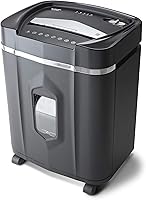
A jam-proof machine removes most of the resets you'd otherwise do. The Fellowes 99Ci detects tough jobs and powers through them automatically, and it's rated for 18 sheets per pass.
It's a heavy-duty cross-cut machine with a 9-gallon pull-out bin and a bin-full LED. It also runs for up to 30 minutes before a cooldown.
That suits a shared workspace more than a desk at home.
The trade-off is size and weight: about 36 lb and 25 inches tall. It also costs more than a basic home shredder.
Pick it if frequent jams are the reason you keep resetting; skip it for light personal use.
How do you fix a shredder that won't restart?
If the shredder stays dead after a reset, check the bin, the power and the thermal state in that order. Those three cover most no-start cases on home units.
Push the bin in until it clicks. A bin that sits slightly forward can trip the safety switch.
Try a different outlet and confirm the cord isn't damaged. Then let the machine sit unplugged for 20 to 30 minutes if it ran hot.
If it still won't start with an empty bin and no paper, the fault is likely internal. Two or three reset attempts are plenty.
After that, contact the brand's support rather than opening the housing, since the cutters and wiring aren't user-serviceable.
How do you avoid repeat resets?
Prevent the jam and the heat shutdown, and you prevent most resets. Two habits do most of the work: feed fewer sheets and keep the cutters clean.
Check your model's sheet limit and stay under it. The 99Ci takes up to 18 sheets, but a basic home unit may take far fewer.
Remove staples and paper clips unless your manual lists them as safe.
Empty the bin when it's full rather than compacting paper down. Then lubricate the cutters on a regular schedule.
Friction and paper dust are behind a lot of binding and stalling, and lubrication is the fix that costs the least.
Which lubricant suits your shredder?
Both products below do the same job, so pick by the format you prefer. Lubricating sheets suit cross-cut and micro-cut owners who want no mess; oil suits people who like to control the amount.
The Amazon Basics sheets are made with vegetable oil and recycled paper, and each measures 8.4 x 6.0 inches. Feed one through the slot and the cutters get a light coat.
The brand says this helps prevent jams and cut down on static dust.
The Fellowes oil goes on the cutters directly. Its long nozzle reaches across the width of the head, and the bottle is meant for cross-cut and micro-cut machines.
The brand says to oil each time you empty the bin or at least twice a month.
Both are safe for most home shredders. Pick the sheets if you'd rather not handle oil; pick the bottle if you want to oil a wide cutter more precisely.
Does a shredder need a reset after overheating?
Usually no, because the thermal cutoff clears itself once the motor cools. A heat shutdown is a protection feature, not a fault.
Most units restart after 20 to 30 minutes with the power left on.
Keep the shredder switched on while it cools so the light can clear. Don't open the housing or aim a fan into it.
If it stays locked after 30 minutes and the bin is seated, treat it as a no-start case and follow the checks above.
Long jobs are the usual cause. Split big stacks into shorter runs with a pause between them.
The 99Ci's 30-minute run time covers most office sessions, but a compact home unit needs more rest.
When should you stop resetting and replace the shredder?
Stop when two or three resets bring back the same fault, or when the cutters are visibly dull or damaged. A shredder that jams every session after cleaning and oiling is telling you something.
Dull cutters chew paper instead of slicing it, which causes jams and heat. A motor that trips its thermal cutoff after a few minutes is another sign.
At that point the reset is treating a symptom, not the cause.
Before you replace it, see how to empty a paper shredder to rule out a seating or bin-sensor problem. If the unit is truly finished, our guide on how to dispose of a paper shredder covers recycling and data safety.
Which shredder brands make resets easier?
Fellowes and Aurora cover most home and office needs, and both publish manuals and support pages with reset steps for each model. Knowing your model's light codes saves time when a shutdown happens.
The Fellowes 99Ci is the pick here for shared offices that stop often. For a smaller desk, a compact Fellowes or Aurora unit costs less and takes fewer sheets.
Our roundups of Fellowes paper shredders and Aurora paper shredders compare the models in each line.
Either way, the reset routine is the same: clear the paper, seat the bin, cycle the power, then test with one sheet. Learn that sequence once and most shutdowns take a minute or two to fix.
Frequently asked questions
Why does my shredder keep stopping?
The most common causes are a full bin, a jam at the cutters, or a heat shutdown from long runs. Clear the bin and the paper path first.
If the motor feels hot, let it cool before you run it again.
Can I reset a shredder by unplugging it?
Yes, on most home shredders a full power cycle clears a fault light. Unplug it at the wall, wait about a minute, then plug it straight back in.
Leave the bin in place, because many models won't run without it.
Is it safe to use oil when I reset a shredder?
Oil after you clear the problem, not as a reset step. A lubricating sheet or a few drops of shredder oil on the cutters reduces friction and buildup.
The Fellowes bottle says to oil each time you empty the bin or at least twice a month.
When should I stop resetting and call for help?
Stop after two or three tries without a change. Repeated resets won't fix a jammed cutter, a damaged bin sensor or a failed motor.
If the shredder still won't run with an empty bin and no paper, contact the brand's support.