How to Maintain a Paper Shredder
Oil the cutters, empty the bin before it fills, clear jams right away and give the motor time to cool. Those four habits cover most of paper shredder upkeep, and they stop the wear and heat that cause most stalls.
On this page (8 sections)
- How often should you oil shredder cutters?
- How do you keep the waste bin from becoming a problem?
- What causes paper jams, and how do you clear one?
- Why does the shredder stop after a few minutes?
- What materials should stay out of the shredder?
- When should you replace a shredder instead of repairing it?
- What does a monthly maintenance check look like?
- How to maintain a paper shredder: the short version
Here's how to maintain a paper shredder: oil the cutters on a schedule, empty the bin before it overfills, clear jams as soon as they happen and let the motor cool between runs. Those four habits prevent most of the problems that send a shredder to the repair bench or the trash.
The routine is short. Most of the work happens in a minute or two after you empty the bin, plus an occasional deeper check.
This guide covers the steps, the products that make them easier and the signs that something needs attention.
How often should you oil shredder cutters?
Oil a cross-cut or micro-cut shredder every time you empty the bin, or at least twice a month, whichever comes first. That's the interval Fellowes gives for its cutters, and it's a good standard for any cross-cut head.
Lubricant conditions the cutters so they keep meshing cleanly. Dry metal rubs against dry metal, and over time that dulls the edges and makes the head work harder than it should.
A light coat keeps the action smooth and helps stop paper dust from packing into the teeth.
Strip-cut shredders are the exception. Their straight blades don't mesh the same way, so many run without added oil.
Check your manual before you start.
What's the easiest way to oil a shredder?
A squeeze bottle with a long nozzle is the easiest way to reach the full width of the cutting head. The Fellowes Powershred oil comes in a 16 oz bottle with an extension nozzle for exactly this job.
Run a thin bead of oil across the cutters, following the path your manual shows. Then run the machine in reverse for a few seconds and shred a sheet or two to spread it.
Wipe any oil that reaches the bin or the housing.
This bottle is built for cross-cut and micro-cut heads. If your machine takes oil differently, follow its instructions over the general habit.
When do lubricating sheets make more sense?
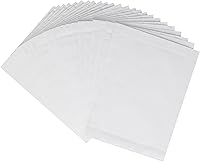
Lubricating sheets suit anyone who wants the job done in one pass without handling oil. The Amazon Basics pack holds 24 sheets that feed straight into the paper slot.
Each sheet measures 8.4 x 6.0 inches. The sheets are made with vegetable oil and recycled paper, and they work with all shredders.
Feed one through the cutters and let the machine do the rest.
Sheets are handy for shared offices where a bottle tends to disappear or spill. They also keep oil off your fingers before you touch the bin or the door handle.
The trade-off is that you can't control how much oil goes on, so a very large head may want the bottle instead.
How do you keep the waste bin from becoming a problem?
Empty the bin before it reaches the full line, not after shredded paper starts backing up into the cutting head. A packed bin pushes paper against the cutters and makes jams far more likely.
An overfilled basket also hides how much you've shredded. The machine keeps running while the outlet is blocked, which strains the motor.
Emptying on a set schedule, such as at the end of each workday, is easier than judging by eye.
Why use a bag inside the bin?
A bag turns emptying into a ten-second job. The Tru Red bags hold up to 15.8 gal of shredded material and come 50 to a box.
The bags measure 27.6 inches high by 24.6 inches wide. They fit most personal shredders.
Lining the basket means you lift the bag out, tie it and drop in a fresh one without lifting a basket of loose confetti.
Clear plastic lets you see how full the bag is without opening anything. Check that the bag doesn't bunch under the cutting head, since a loose fold can catch the shreds and cause a clog.
Our guide to how to empty a paper shredder covers the safe order of steps.
What causes paper jams, and how do you clear one?
Most jams come from too many sheets at once, folded paper or material the machine wasn't built for. Clearing one starts with the reverse switch, not with pulling the paper out by hand.
Try reverse first. Many machines have a dedicated reverse setting that backs the paper out.
If that doesn't free it, unplug the machine and follow the manual for removing the jam.
Never reach into the cutting head with your fingers, and never use a screwdriver or knife to pry paper loose. A tool can damage the cutters or trip a safety interlock.
How do you prevent jams in the first place?
Feed fewer sheets than the rated maximum. A machine rated for 10 sheets does best with 7 or 8, especially when the paper is glossy or heavy.
Fan the stack before feeding so pages don't clump.
Keep staples and paper clips out unless your manual says the shredder handles them. Folded or crumpled paper feeds unevenly and jams more often.
A stack that goes in crooked is a stack that's likely to stall.
Oil the cutters on schedule too. Dry cutters grip paper harder, and a light coat helps sheets pass through smoothly.
Why does the shredder stop after a few minutes?
Almost every small shredder has a duty cycle, a set run time before the motor needs to cool. A stop after 5 or 10 minutes of steady work is usually the machine protecting itself, not a fault.
The run and rest times are in your manual. A typical home machine might run for a few minutes and then need a longer rest.
Pushing past that cycle overheats the motor and shortens its life.
Shred in shorter bursts and let the machine rest between them. If it keeps stopping well before the stated cycle, check for a jam, a full bin or a clogged outlet.
Does the motor need cleaning?
Keep the vents clear of dust and paper scraps. Wipe the outside with a dry or slightly damp cloth.
Dust on the vents traps heat, and heat is what the duty cycle is designed to manage.
Don't spray cleaner into the vents or onto the cutting head. Liquids and electronics don't mix.
A dry brush around the vents is enough for most home machines.
What materials should stay out of the shredder?
Shred paper and whatever else the manual allows, and nothing more. The manual is the authority on staples, clips, CDs and cards.
Feeding the wrong material is a top cause of damage. Adhesive labels, thick cardboard and glossy stock can gum up the cutters or overload the motor.
Wet paper turns into a pulp that packs into the teeth.
Batteries and electronics should never go in a shredder. For machines at the end of their life, our guide to how to dispose of a paper shredder covers the safe options.
When should you replace a shredder instead of repairing it?
Replace it when the cutters stay dull after oiling, the motor overheats quickly or repairs cost more than a new machine. Maintenance prevents most wear, but it can't undo a head that's already worn out.
Signs of a worn head include ragged cuts that don't separate cleanly and repeated jams on light loads. If oiling and shorter runs don't fix those, the cutters are the problem.
Which brands are worth a look?
Fellowes builds a range of home and office shredders with cross-cut heads, and its oil is made for those cutters. Compare models in our roundup of Fellowes paper shredders.
Aurora covers budget-friendly machines for home desks. Our guide to the Aurora paper shredders lays out the options.
Either way, a machine with a clear duty cycle and an easy-to-empty bin is easier to keep in good shape.
What does a monthly maintenance check look like?
Once a month, do a quick walk-around: oil the cutters, empty and reline the bin, clear the vents and test the reverse switch. It takes a few minutes and catches small problems early.
Check the power cord for fraying and the plug for damage. Make sure the bin sits fully in place, since many machines won't run unless the basket is seated.
Listen for unusual noises during a test shred.
Wipe the housing and the outside of the bin. Keep the manual nearby, since duty cycles and allowed materials vary by model.
A machine that's cleaned and oiled on a schedule usually outlasts one that's only fixed when it breaks.
How to maintain a paper shredder: the short version
Maintaining a paper shredder comes down to oil, empty, clear and cool. Oil cross-cut cutters at least twice a month, keep the bin below the full line, clear jams with reverse rather than force, and respect the duty cycle.
Pick the Fellowes oil bottle for a wide cutting head and steady control over how much lubricant goes on. Pick the Amazon Basics sheets for a no-mess, one-pass routine in a shared space.
Pick the Tru Red bags to make emptying quick and keep the basket from overfilling.
Do those three small things and the big problems, dull cutters, jammed heads and overheated motors, mostly stay away. If your machine is already past saving, how to dispose of a paper shredder explains the next step.
Frequently asked questions
How often should I oil a cross-cut shredder?
Fellowes says to oil a cross-cut or micro-cut shredder each time you empty the bin, or at least twice a month. A busy office can oil more often, and a light machine at home can stick to the twice-monthly minimum.
Can I use cooking oil or WD-40 on shredder cutters?
No. Cooking oil turns gummy and attracts dust, and general-purpose sprays can leave a sticky film on the blades.
Use a lubricant made for shredders, either a squeeze bottle of shredder oil or lubricating sheets.
Do I need to oil a strip-cut shredder?
Usually not. Lubricant is meant for cross-cut and micro-cut heads, where the cutting shafts mesh and benefit from conditioning.
Strip-cut heads cut in straight lines and generally run without added oil, so check your manual first.
What should I do before I empty the bin?
Unplug the shredder or switch it off first, then lift out the basket and bag. Never reach into the cutting head while the machine is plugged in, even when it looks stopped.
Our guide to emptying a paper shredder walks through the safe order.