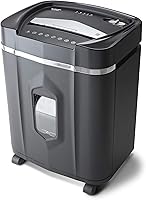
Aurora AU120MB Shredder Review: Worth It? (November 2026)
The Aurora AU120MB is a solid buy for anyone who lets paperwork pile up before shredding. Its 120-sheet auto feed handles a stack at once, and P-4 micro-cut pieces keep sensitive documents out of reach. Skip it if you only shred a few sheets a week or need a bin bigger than 5 gallons.
On this page (8 sections)
The Aurora AU120MB is worth buying for a home office that shreds in bursts. Load up to 120 sheets in the auto feed and walk away, or feed 10 sheets through the manual slot when you need one document handled now.
It's a P-4 micro-cut machine with a 30-minute run time and a 5-gallon pullout bin.
This Aurora AU120MB review walks through what the machine actually does well, where the design gets in your way, and which shredder to buy instead if your habits don't match. The short version: it suits stack shredders and frustrates people who only need a few sheets a week.
The Aurora AU120MB at a glance
The AU120MB is a stack-first shredder for a home office or small business desk. Its 120-sheet auto feed does the heavy lifting, and the manual slot covers the odd single document.
Security is P-4 micro-cut, so the output is small enough to be hard to read and hard to piece back together.
Aurora AU120MB 120-Sheet Auto-Feed Shredder: Best for stack-at-once shredding

- 120-sheet auto feed
- 10-sheet manual feed
- P-4 micro-cut
- 30-minute continuous run time
- 5-gallon pullout bin
A stack-friendly shredder for home offices that build up paper over weeks. Load up to 120 sheets and let it work, or feed 10 sheets at a time when you need one document gone now.
Pros
- Auto feed takes a whole stack without babysitting
- P-4 micro-cut pieces are hard to read
- 30-minute run time covers a long catch-up session
- LED lights flag jams, overload and a full bin
Cons
- The 5-gallon bin fills quickly with micro-cut pieces
- It weighs 28.7 lb, so moving it takes some effort
- Manual feed tops out at 10 sheets
The 30-minute continuous run time is the number that matters most for catch-up sessions. A home office rarely shreds every day, so the machine often sits idle for a week and then gets fed a full tray of bank statements, old invoices and junk mail.
Thirty minutes covers that kind of load without a long cooling break in the middle.
Who this shredder is for
Buy it if your paper builds up in a tray or a box and you clear it every few weeks. The auto feed means you don't stand there pushing sheets in one at a time, which is the whole point of paying more for this design.
Skip it if your typical shredding session is five sheets once a week. A smaller, lighter manual shredder gets the job done without the footprint or the weight of this machine.
What the 120-sheet auto feed changes about daily use
The auto feed is the feature you're paying for, and it decides whether this machine fits your routine. Load a stack into the feed tray, and the shredder pulls sheets through on its own until the stack runs out.
You can walk away and do something else while it works.
The 10-sheet manual slot sits alongside it for single documents. That matters when a piece of mail arrives with an account number on it and you want it gone before it lands on the counter.
You feed it, it shreds, and you don't need to start a whole auto-feed session.
The split matters for how you sort paper. Anything you'll shred in bulk goes into a stack and waits.
Anything urgent goes through the manual slot as it arrives. That two-bin habit keeps sensitive paper off your desk without turning shredding into a daily chore.
One practical limit: the auto feed takes flat, unstapled sheets. Pull staples and paper clips first and remove binder clips.
A stack that's uneven or has folded corners can feed crooked, so square up the paper before loading it.
Specs that matter in daily use
The specs that matter most are cut size, run time and bin capacity, because those three decide how often you stop and empty. The AU120MB cuts paper and credit cards into pieces about 5/32 by 15/32 inches, which is P-4 micro-cut.
That's a security level suited to bank statements, tax records and anything with a signature or account number.
| Detail | Aurora AU120MB |
|---|---|
| Cut type | Micro-cut, P-4 |
| Shred size | 5/32 x 15/32 in |
| Auto feed capacity | 120 sheets |
| Manual feed capacity | 10 sheets |
| Continuous run time | 30 minutes |
| Bin capacity | 5 gallons |
| Bin style | Pullout |
| Dimensions (H x W x D) | 19.69 x 14.41 x 11.3 in |
| Weight | 28.7 lb |
| Status lights | Standby, overheat, bin-full, overload, feed error, door open |
| Warranty | 1 year |
The 5-gallon bin is the spec to think hardest about. Micro-cut pieces are much smaller than strip-cut shreds but they still take up volume, and a bin that holds 5 gallons fills faster than the number suggests during a long session.
Plan to empty it at the end of each big clear-out rather than waiting for the bin-full light.
The 28.7 lb weight and 19.69-inch height also matter. This isn't a machine you tuck onto a crowded desk or move between rooms.
Give it a fixed spot near an outlet with room to pull the bin out.
Aurora lists the machine as ultra-quiet, which is worth weighing against your workspace. A home office with a call going on benefits from a quieter shredder, though a micro-cut machine still makes noise while it works through a stack.
Setting up the AU120MB in a home office
Setup is mostly about placement and power, not assembly. The machine arrives ready to use, so the real work is finding a spot that lets the auto feed, the manual slot and the pullout bin all work without rearranging your office.
Measure the spot first. The footprint is 14.41 inches wide and 11.3 inches deep, and the machine stands 19.69 inches tall.
Leave clearance above the feed tray so you can load a stack without fighting a shelf, and leave space in front for the bin to slide out.
Put it near a grounded outlet and keep the cord out of walkways. The status lights sit on the machine, so you want to see them without crouching behind a desk.
That matters for the overheat and bin-full lights, which tell you when to stop.
Run a short test before you trust it with anything sensitive. Feed a few plain sheets through the manual slot and a small stack through the auto feed.
Listen for a smooth pull and check that the pieces land in the bin rather than scattering.
Then set up the two-bin habit: a stack tray for bulk paper and a small tray for documents that need shredding now. It takes a few days to become routine and saves you from sorting a mixed pile later.
Care, jams and keeping it running
The AU120MB is built to avoid jams rather than clear them, so most care is preventive. Aurora lists auto reverse for jam prevention and overload protection, and the LED panel flags a feed error or an overload before the machine stops dead.
If a jam does happen, switch off and pull the plug before you reach into the feed. Clear the sheets you can see and follow Aurora's instructions for reversing the rest.
Don't force a stuck stack through, because that's how cutters get damaged.
Empty the bin when the light comes on rather than pressing on past it. Overfilled bins back up into the cutting mechanism and cause the jams the auto reverse is meant to prevent.
A quick empty after each big session keeps the machine happy.
Shredding credit cards deserves a little care. Aurora lists cards among the materials it handles, but feed them one at a time and keep them out of a mixed auto-feed stack.
Cards are thicker than paper and can throw off an even feed.
Oil the cutters on the schedule Aurora recommends. A few passes of shredder oil through the manual slot keeps the blades moving freely, especially after a heavy session of dense paper.
If you're new to maintenance, our guide to shredder oil and maintenance covers how often to do it.
The 30-minute run time also sets your rhythm. If you're clearing a very large backlog, work in sessions and let the machine cool when the overheat light comes on.
Treating that light as a real stop keeps the motor healthy.
The trade-offs before you buy
The AU120MB's limits are bin size and weight, and both come from the auto-feed design. A 5-gallon bin paired with micro-cut output means frequent emptying during long sessions.
A larger-bin machine would let you shred more before stopping, but it would also take up more floor space.
The 28.7 lb weight is the other real trade-off. This machine wants a permanent home.
If you need to move your shredder between rooms or tuck it away after each use, a lighter model makes more sense.
The 10-sheet manual feed is a third consideration. Ten sheets is fine for single documents, but if you often have 20 or 30 loose sheets that aren't stacked neatly, you'll be feeding them in batches through the manual slot or adding them to the auto feed.
None of these are dealbreakers for the right buyer. They're the price of a machine that handles a full stack without you standing over it.
Weigh them against how much paper you actually shred in a session.
Alternatives worth a look
Two other machines fit different habits better. One is a lighter Aurora micro-cut for everyday small jobs, and the other is a Fellowes model if you want a different brand's approach.
Our roundup of the best Aurora paper shredders puts the whole Aurora range in one place.
Aurora AU1210MA micro-cut shredder
The Aurora AU1210MA is the lighter, manual-feed alternative in the Aurora range. It suits a desk that handles a handful of documents at a time rather than a full stack.
If your shredding is a few sheets a week, the AU120MB's auto feed and 28.7 lb weight are more machine than you need. A manual micro-cut keeps the security level without the bulk.
A Fellowes shredder for brand variety
If you'd rather compare across brands, look at a Fellowes paper shredder in the same micro-cut class. Fellowes is the other name most home offices consider, and its models give you a second reference point on bin size and run time.
The AU120MB's edge is the 120-sheet auto feed at this price tier. If a Fellowes model offers a bigger bin or a lighter body, that may matter more to you than stack feeding.
Compare the run time and bin capacity side by side before deciding.
A compact Amazon Basics pick
For a small desk with light shredding, a Amazon Basics paper shredder is the budget route. It's the machine to consider if you want a second shredder in a home office rather than one that handles every document.
The AU120MB stays the better choice for a primary shredder that takes a full stack. A compact model works as a backup or for a second room where you only feed a few sheets.
Verdict: buy the AU120MB if you shred in stacks
The Aurora AU120MB is a buy for stack shredders, and the auto feed is the reason. Load up to 120 sheets, walk away, and come back to P-4 micro-cut pieces.
The 30-minute run time covers a real catch-up session, and the status lights tell you when to stop.
Skip it if you shred a few sheets a week or need to move the machine around. The 5-gallon bin and 28.7 lb weight suit a fixed spot in a home office, not a desk that gets rearranged.
For light shredding, the Aurora AU1210MA is the easier fit.
For most people who let paper pile up and then clear it in one go, this Aurora AU120MB review comes down to one point: the auto feed saves you the most tedious part of shredding. If that's your routine, buy it.
If it isn't, a simpler manual shredder will serve you better.
Frequently asked questions
How many sheets can the Aurora AU120MB shred at once?
It takes up to 120 sheets through the auto feed and up to 10 sheets through the manual slot. Use the auto feed for a full stack of mail and the manual slot for single documents you need gone right away.
What security level is the Aurora AU120MB?
It's P-4 micro-cut, cutting paper and credit cards into pieces about 5/32 by 15/32 inches. That size makes the pieces hard to reassemble, which suits bank statements, tax papers and anything with an account number on it.
How long can the Aurora AU120MB run without a break?
Aurora rates it for 30 minutes of continuous shredding. After that, the overheat light comes on and it needs to cool.
A 30-minute window is enough for most home offices to clear a backlog in one sitting.
Does the Aurora AU120MB shred credit cards?
Yes. Aurora lists credit cards among the materials it handles, alongside paper.
Shred expired cards one at a time rather than feeding a stack of them, and keep staples and paper clips out of the auto feed.
What size is the bin on the Aurora AU120MB?
The bin holds 5 gallons and pulls out for emptying. Micro-cut pieces are much smaller than strip-cut shreds but settle loosely, so expect to empty the bin more often during a big clear-out.
Is the Aurora AU120MB good for a small home office?
Yes, if your paperwork arrives in stacks rather than single sheets. It's heavy at 28.7 lb and needs a spot with room for its 14.41-inch width, so give it a fixed place on the floor or a sturdy low shelf.